A Bot Attacked My Newsletter Form. How to Protect Yours
A bot attack on a newsletter form, known as subscription bombing, means a bot signs up real people's addresses and your provider sends them confirmation emails from your domain. In my case more than 200 unwanted emails went out, and only moving verification to my own server closed the hole.

Bot attack on a newsletter form in short
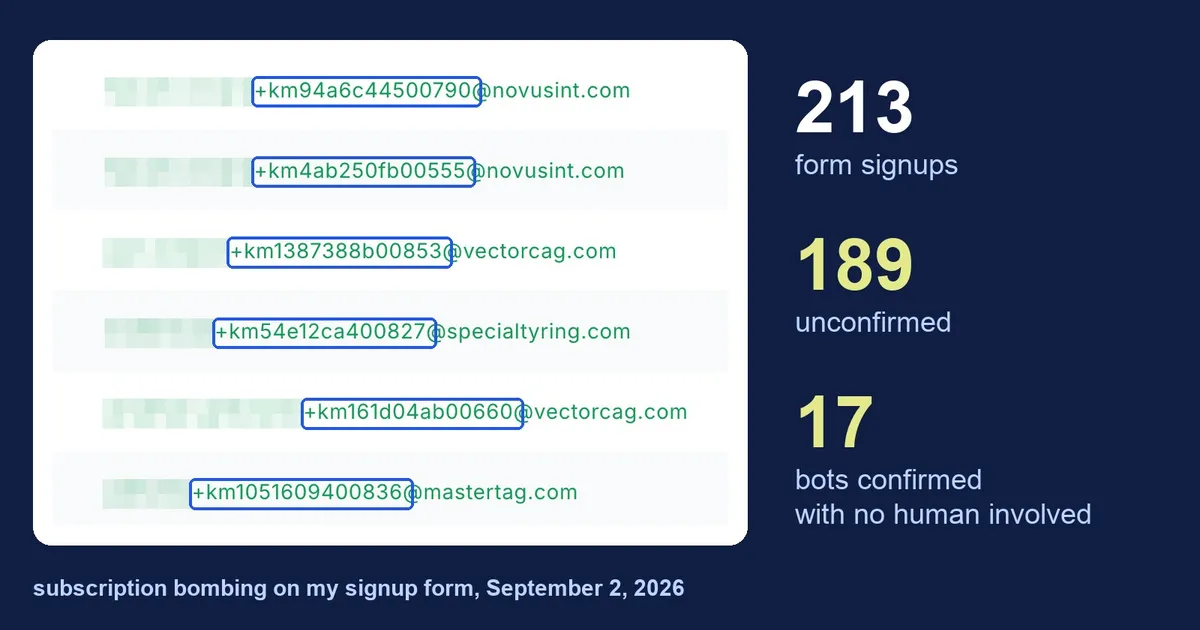
- A healthy double opt-in form has 20 to 40% unconfirmed signups, and mine had 89% (189 out of 213). A share like that means a bot, not weak conversion.
- A form marked “inactive” in the MailerLite panel kept accepting signups, because the status only says whether the form is embedded somewhere, not whether its endpoint accepts data. Only deleting the form closed the endpoint, and afterwards the same POST returns 404.
- A captcha, a honeypot and a fill-time check run in the browser, while a bot sends a raw POST straight to the provider's endpoint and never sees them. The check has to happen on a server you control.
- Double opt-in is not enough, because corporate email scanners (Proofpoint, Mimecast, Barracuda) fetch every link and click the confirmation link themselves. Of my 24 “active” addresses, only 7 were real people.
- On my own signup endpoint (in my case a native Vercel function in the api/ directory) the cheapest of eight checks go first, and the one step a raw POST cannot skip is server-side verification of the Cloudflare Turnstile token.
- In MailerLite, remove suspicious addresses with Forget, not Delete: Forget erases the data completely within 30 days, which fulfills the GDPR right to erasure.
This is not a theory piece. It is a write-up of an incident from September 2, 2026 and of what I changed afterwards.
How it started: autoresponders from people I don’t know
The first signal did not come from analytics. It came to my contact inbox. I started getting autoresponders. “Sehr geehrte Damen und Herren, ich befinde mich derzeit nicht im Büro.” “Thank you for sending your email. I am currently out of office.” From people at German and American industrial companies I had never seen in my life.
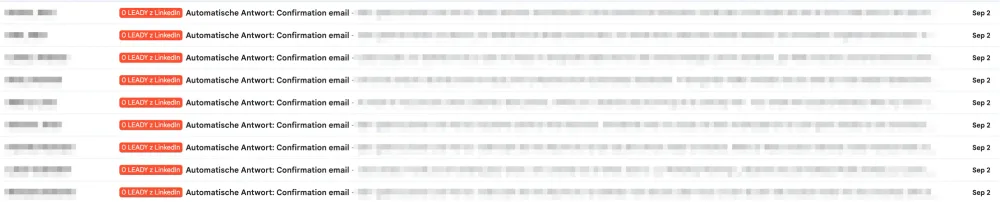
Where did it come from? I was not running any campaign in the German or American market and I did not know a single one of these companies (foundries, freight forwarders, fastener manufacturers). And the autoresponders were replies to my email, meaning something from my domain had sent these people a message.
First thought: someone broke into my mailbox. I check the server. Clean. I check the logs, also clean, and… no trace of the emails that these autoresponders supposedly answer. I check the email headers, suspecting some kind of phishing. They are correct. I check the DNS, then the domain configuration with a great tool I recommend: MXToolbox. Everything is perfect. So something, somehow, is sending emails as me, but it is not me and not my mail server.
What was left? The newsletter. I opened the MailerLite panel and there it all was.
Diagnosis: 17 signups in four hours
I exported the list of active subscribers and the first thing that jumped out was the shape of the addresses:
juan.salazar+km1387388b00853@vectorcag.com
msherman+km54e12ca400827@specialtyring.com
jonathan.jankowski+km161d04ab00660@vectorcag.com
jstevens+km1051609400836@mastertag.com
Every one the same: a name, a plus sign, km, eight hex characters and five digits. Would seventeen people typing into a form produce that pattern? No. One script would.
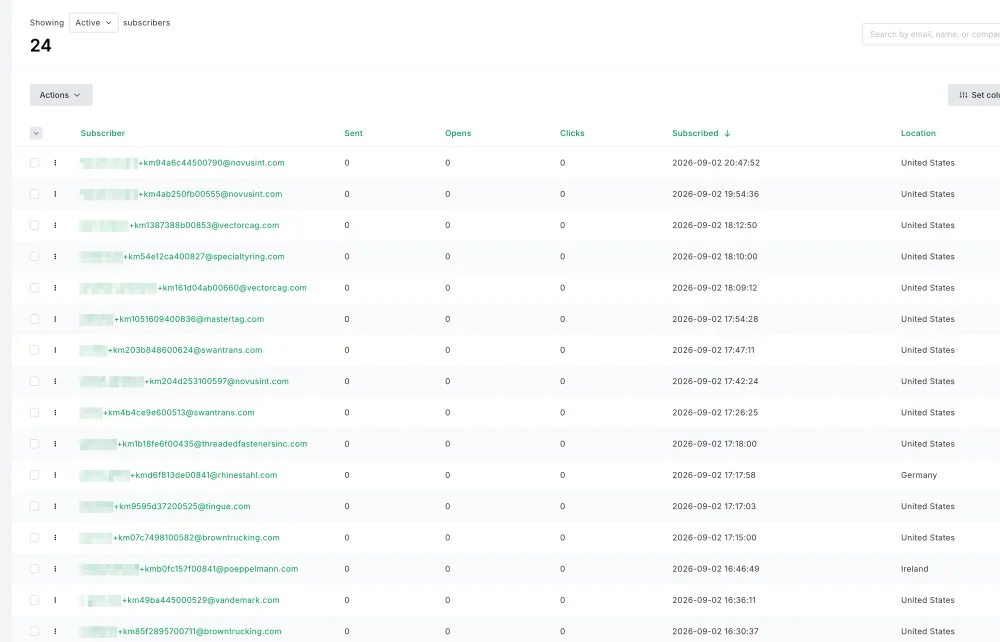
There were more signals. 17 confirmed signups between 16:27 and 20:47 on a single day is not my normal traffic (for me it is one signup every few weeks), the signup IPs came from home networks all over the world, and the confirmations came from AWS and Microsoft data centers. German and American industrial companies signing up for a Polish-language newsletter about LinkedIn: zero business sense. And the domains were not made up. Behind every address was a real person at an existing company.
The last registration had a timestamp later than my export. The bot was working while I was diagnosing it.
The real scale: 213 signups, 189 unconfirmed
I went into the form settings and it turned out this was not a one-day incident. I created the form on June 9. Since then:
| Metric | Value |
|---|---|
| Total signups | 213 |
| Confirmed (active) | 24 |
| Unconfirmed | 189 |
| Share unconfirmed | ~89% |
A healthy double opt-in form has 20 to 40% unconfirmed. At 89% there is no point talking about weak conversion. It is a bot.
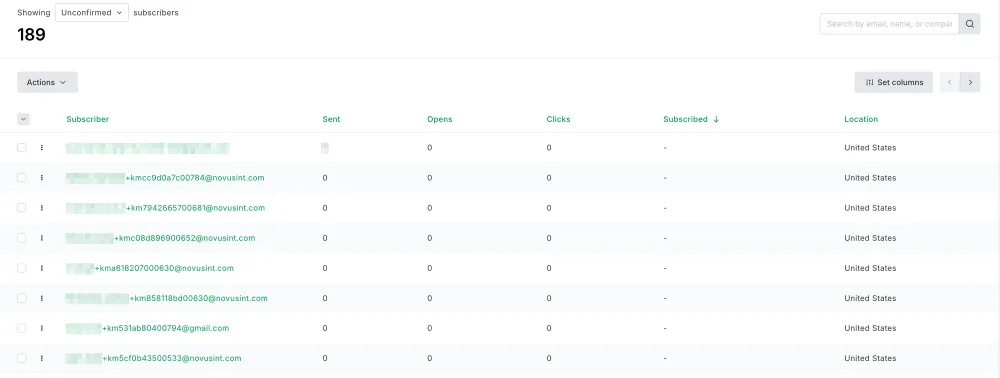
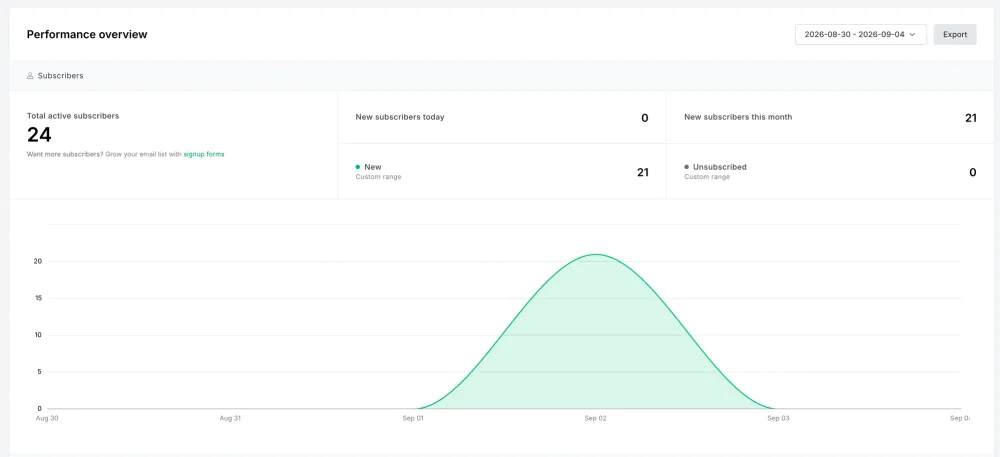
The second number was worse. I went through the 24 “active” addresses one by one. How many real people? Seven: two of my own test addresses and five people who signed up themselves between February and August. The remaining 17 were bots from a single day, confirmed on their behalf by someone, or rather something.
What this actually is: subscription bombing
Is this some exotic case? No, it is a catalogued attack technique. MITRE ATT&CK lists it as T1667 “Email Bombing” under the Impact tactic, and the definition talks about automated bots signing the victim’s address up to mailing lists that do not verify new signups.
How does it work?
- The attacker has a list of real corporate addresses: from a leak, from scraping, or from a data broker. In my case it was probably industrial espionage.
- The bot finds signup forms, works out which endpoint serves them, and sends requests to it with those addresses.
- Every form fires a confirmation email from the site owner’s domain, with valid SPF and DKIM.
- The victim receives hundreds or thousands of emails in a short time.
- The target of the attack is not the form itself or my website, but the endpoint at the provider that serves the form.
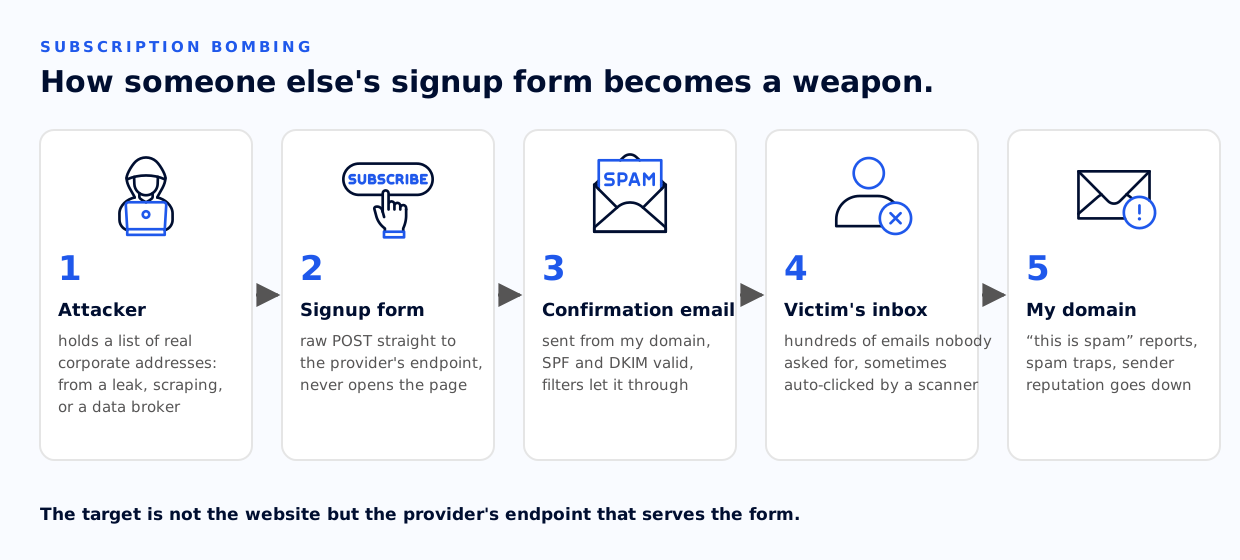
Why real addresses? Because only those work. A fake address bounces, while a real inbox accepts the email, triggers the confirmation and produces a predictable effect. Proofpoint stresses one thing: confirmation emails come from legitimate domains with valid authentication, so they pass reputation-based spam filters. The classic use is to flood the victim’s inbox so that a fraud alert or a password change notification gets buried in it.
And the +km with the hash? Most likely a tracking tag: the attacker wants to know which form a given address went through. I found no public source attributing this signature to a named group, so I treat it as a fingerprint for filtering, not as a firm identification.
There are two victims at once. The people whose addresses were used get an email they never asked for. If it gets confirmed, and in my case 17 of them did, the criminals already have data for the next step. And me? My sending domain sent more than 200 unwanted messages. Every “this is spam” click on the other end weighs on my reputation, and spam traps in lists like these can put a domain on a blacklist. Fortunately I detected and blocked the attack quickly enough that this did not happen.
Why my defenses did not work
I had things switched on that in theory should have been enough. All of them failed, one after another.
1. Captcha and honeypot only work in the browser
The form had a honeypot I wrote myself, a hidden field that a human does not see and a bot fills in, plus a mechanism measuring fill-in time. If the form was completed in under 3 seconds, a bot did it, not a human. I thought I had been clever, and for a few months it did its job. I added IP logging and a check for multiple signups from a single IP, and I slept well. Where was the problem and why did it fail in the end? All of these defenses happen in the browser. A bot sending a raw POST to the form endpoint never loads the page, never renders the widget and never sees the honeypot. For a few months the IP blocks and the rate limit held, but the hackers apparently noticed and changed tactics, because the logs show they started using a botnet and every attempt came from a different IP.
Cloudflare says so in the Turnstile documentation: the client-side widget alone does not protect a form, because the token can be forged and an attacker can send any string to the endpoint without passing the challenge. Server-side verification is therefore mandatory, not optional.
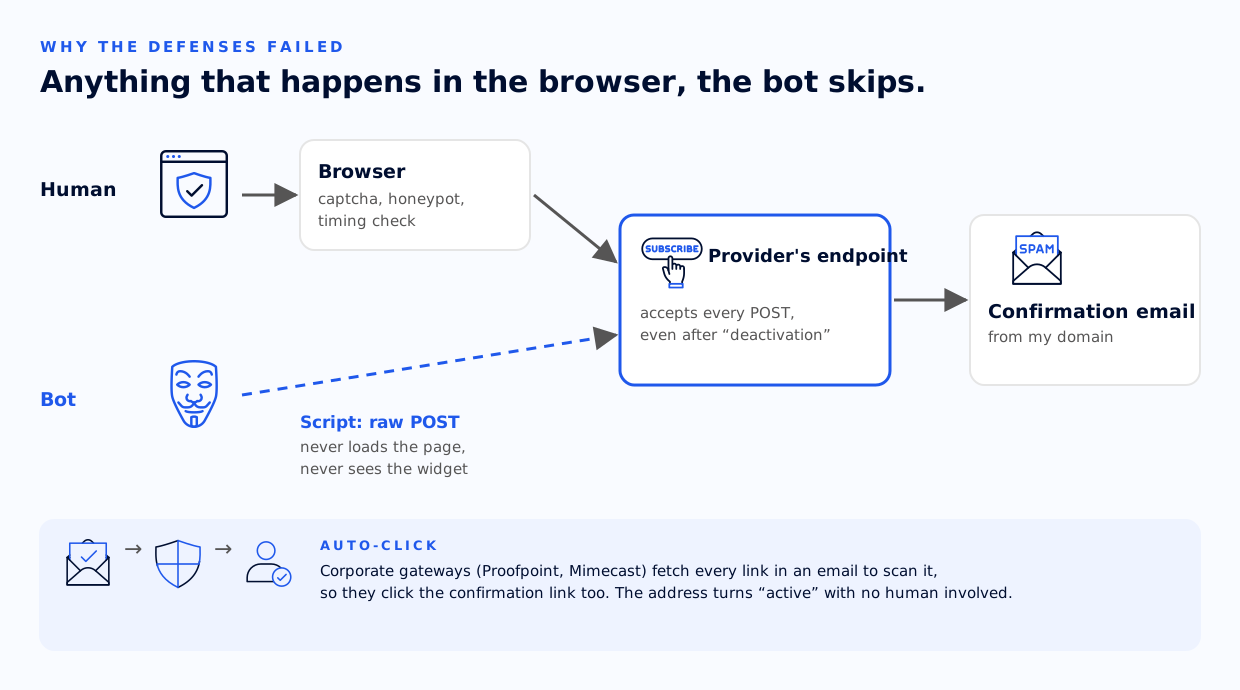
So the question for your own newsletter provider is: is the captcha verified on the server, or only rendered? You can check it yourself. Send a POST with curl to your form’s endpoint, skipping the widget. If the address shows up on the list, the captcha is decoration.
2. Corporate scanners bypass double opt-in
This surprised me the most. Some of the bot addresses were active despite double opt-in being on. Someone clicked the confirmation link. Who? No human.
Corporate security gateways (Proofpoint URL Defense, Mimecast URL Protect, Barracuda) fetch every link in incoming mail to scan it before delivery, so they also click the double opt-in confirmation link. The address turns active without any human involvement or consent.
This has been a known problem in the marketing automation community for years, and the consensus is that a link click cannot be treated as proof of consent. My data shows it: the IP addresses the confirmations came from belong to AWS and to Microsoft’s mail infrastructure. The companies on my list fit exactly that profile, corporations with security gateways. Hence the mix: some addresses confirmed automatically, most not.
3. The “inactive” flag in the panel blocks nothing
Once I knew what was happening, I first removed the form from the site and disabled it in MailerLite, then started checking the logs. Imagine my surprise when it turned out that the form had the value false in the API, meaning it was marked inactive, and nothing changed. The last registration? A signup from an hour earlier, when the form was already disabled.
How is that possible? The form status in the panel only says whether it is embedded somewhere and active, not whether its endpoint accepts data. The endpoint lives its own life as long as the form exists.
I also checked whether it could simply be switched off through the API. It cannot, because MailerLite exposes only GET, PUT (which changes nothing but the name) and DELETE for forms, and there is no “disable” operation at all. The only thing that closes the endpoint is deleting the form, so that is what I did. After deletion, the same POST that used to add subscribers returns 404.
The price is the irreversible loss of the form content, statistics and confirmation page configuration (the addresses in the group stay), and coming back means a new form with a new identifier.
4. A provider-hosted form is a separate back door
The last thing I found: my form had its own public page hosted by MailerLite, with a short slug, independent of my domain. What would rewriting my entire site have given me? Nothing, because the bot was not hitting my site. Hosted forms are a feature of these tools, not an add-on.
Beware of a false lead
My first instinct: if not delete, then maybe hide the form identifier in the JavaScript code so the bot cannot read it. That makes no sense. Form code is always client-side, so the bot reads it from the bundle just as easily as from the HTML. That is obfuscation, not security.
How I fixed it: my own endpoint instead of the provider’s form
What closes this vector? Only one thing: moving the verification to a server I manage myself.
| Approach | Where the bot check happens | Safe? |
|---|---|---|
| Provider’s embedded snippet | Browser | ❌ |
| Hosted form / popup | Browser + public URL | ❌ |
| Own HTML → provider’s endpoint | Browser | ❌ |
| Own HTML → own endpoint → provider’s API | Server | ✅ |
Why only the fourth variant? Because the bot has no way to skip a step that runs on my side. On top of that the API key stays secret, and it was precisely its absence that previously forced a public, and therefore vulnerable, endpoint. By default, when you install a signup form on your WordPress or any other site, you are using exactly that ready-made snippet from the provider. It is a really bad idea.
Where to put the endpoint
My site is an Astro framework project on Vercel, statically generated. I checked whether an official integration exists. It does, and the instructions say: install the official adapter and turn this into a server route. I looked into it and let it go. Why? Because Vercel’s documentation on Astro says not to use vercel.json for rewriting paths in Astro projects: it produces inconsistent behavior and is not officially supported. I would have had to move the site from Vercel to Cloudflare, for example, and I see no need for that.
My vercel.json carries the production Content-Security-Policy, a full set of security headers, 17 SEO redirects and trailingSlash. The adapter takes over writing the output configuration. Betting all of that on an unverified assumption, and as part of a security fix at that? A bad idea, and a bit of swapping one problem for another.
I chose the variant that solves the problem instead of working around it: build a native Vercel function from scratch in the api/ directory of the main repo. It builds independently of the detected framework and with no configuration. The site stays one hundred percent static, vercel.json remains the single source of truth, and the Astro build does not change by a single line.
A catch that is easy to forget
Astro has a built-in security.checkOrigin protection that rejects POSTs from foreign domains. It works for Astro routes, and a native Vercel function is not an Astro route. The Origin header check has to be written into it by hand. It is the same kind of silent bug that let the bot in before.
The security flow in the final solution
The order of the checks matters: the cheapest ones go first, so the bot burns as little of my compute budget as possible. I do not want an extra invoice from Vercel after a month for server time spent serving bots, and neither do you.
- Stop on configuration errors: if any environment variable is missing, the endpoint returns
503, quits and reports the IP to fail2ban. An open endpoint with its checks disabled is the state I had just climbed out of. Brutally simple and effective. Origincheck, meaning POSTs from foreign domains are rejected.- Honeypot: if the hidden field is filled in, I return a fake
200and do not tell the bot it was caught. It thinks it succeeded, so it does not retry. - Timing check: rejecting submissions faster than 3 seconds or older than 6 hours. The value comes from the browser, so a bot can forge it; this is a free filter, not a security measure. It worked for me for a long time and it will work for you too, because getting around it takes more effort from the hacker.
- Address validation: basic, but required.
- Server-side verification of the Turnstile token, the one step a direct POST cannot skip. The last line of defense and the most effective one.
- Only now the call to the newsletter provider’s API, with the secret key and the status “unconfirmed”.
- A generic response, identical for every rejection. The bot never learns whether the honeypot, the timing or the captcha stopped it, so there is nothing to iterate on.
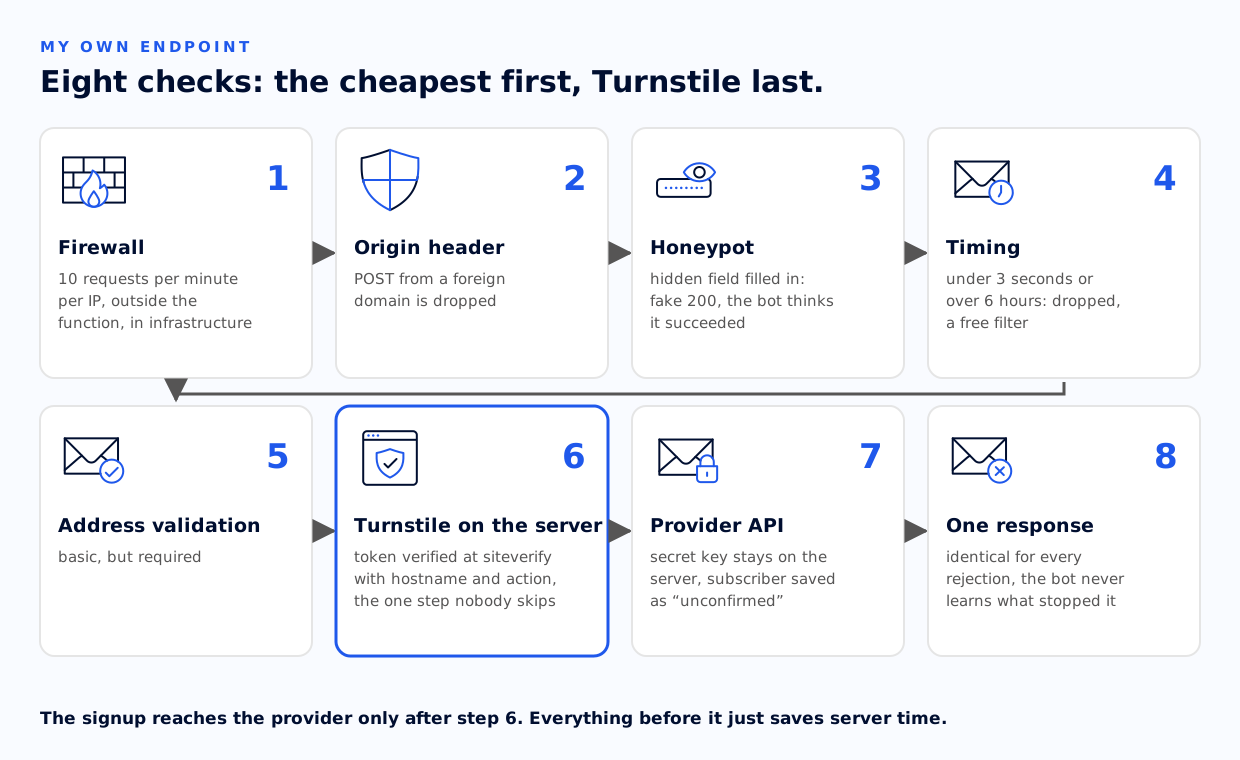
Two things from the classic guides are missing here, and deliberately so.
There is no per-IP rate limiting in the code. Its place is in the infrastructure (for me, a firewall rule on the endpoint path, 10 requests per minute per IP), not in a function that starts from zero on every call and has nowhere to keep a counter. The caveat still stands: my bot came from distributed residential addresses, so an IP limit alone would not have stopped it.
There is no +km pattern filter either. It was tempting, but that is a defense against the previous attack. The attacker changes the tag in a minute, and I am left with a rule that one day rejects a real person using plus addressing. The signature is good for cleaning the list and for alerts, not for the front gate.
Captcha verification
In the end I chose Cloudflare Turnstile. Why? It is free, without limits and without a requirement to host the site on Cloudflare, and it sets no persistent identifiers, so it does not track across sites. It also hurts least under GDPR: the French CNIL and the German data protection authority have taken action against sites using reCAPTCHA without explicit consent, because reCAPTCHA sets a persistent cookie and shares signals within the Google ecosystem. And reCAPTCHA is exactly what the built-in MailerLite form offers. Using it, I would have had not only a security hole but also a consent obligation under GDPR.
Server-side verification is one POST to Cloudflare’s siteverify endpoint with the parameters secret, response (the token from the form’s hidden field) and optionally the user’s IP address. In the response I check not only success but also hostname and action, so that a token generated on another site or for another form does not pass.
Two limitations: the token is valid for 300 seconds and it is single-use. On the browser side it is easy to trip over this. If the signup fails and the user stays on the page, their token is already spent, so the second attempt goes out with a burned token and the server rejects it, even though everything is fine on the human’s side. The widget has to be reset after every failed attempt.
Hardening the confirmation page: what could not be done
The advice in every guide is: do not confirm the signup on the mere visit to the link, but lead it to a page that confirms nothing yet, with a “Yes, confirm my subscription” button that sends a POST. The scanner does a GET and fetches the page, but it does not click the button. A human does.
The logic is flawless, but with double opt-in on the provider’s side it is not feasible. Why? The confirmation link is generated and handled by the provider. It leads to their endpoint, that endpoint activates the subscription, and only then does it redirect to my thank-you page. The scanner’s auto-click therefore hits the target before anything reaches my server.
To really do this, you would have to take over the whole double opt-in: save people with the status “unconfirmed”, send your own confirmation email with your own link, and switch the status yourself after the button click. That means your own transactional sending and taking responsibility for deliverability on yourself.
I did not do that, and I do not consider it a shortcut. The auto-click was only harmful because bots were getting onto the list at all. Once the captcha weeds them out before the provider ever hears of them, there is nobody left to falsely confirm.
Implementation checklist for a proper newsletter signup form
If you want to carry over what I checked on my side, here is the minimal to-do list. For me the first item was enough to know something was wrong.
Right now, within the hour:
- Check the ratio of confirmed to unconfirmed signups at your provider. That is your diagnostic test.
- Test with curl whether your form’s captcha is verified server-side.
- Pause mailings to the contaminated group.
Cleaning the list:
- Segment the suspicious addresses: by pattern, by date, by domain.
- Remove them with Forget, not Delete. Forget erases the data completely within 30 days, which fulfills the GDPR right to erasure, and these are the personal data of real people nobody asked for consent.
- Never manually activate unconfirmed records.
Target architecture:
- Your own server endpoint instead of the provider’s snippet.
- The API key in environment variables, never in client code.
- A captcha with mandatory server-side verification that also checks
hostnameandaction. - Honeypot and timing check as free filters, not as security.
- An
Originheader check if the endpoint sits outside the framework. - Removal of the public provider-hosted form. Check whether “deactivation” closes the endpoint, because it usually does not. Frankly, I consider this a serious MailerLite failure, and writing in their help center that they know about it and there is no way to protect yourself does not interest me much. In my opinion it is a flaw at the architecture level.
- Per-IP rate limiting at your server’s infrastructure level plus reporting to fail2ban.
- An alert on a sudden spike in signups: simple to build, and it would have caught an attack like this in under an hour.
What not to do
- Do not block all addresses with a plus sign. Plus addressing (writing an email as ada.kowalska+rafalsnewsletter@gmail.com) is a legitimate, useful feature, and email marketing experts like Paweł Sala advise against blocking it wholesale. Filter the signature you observed, not the whole class of addresses.
- Do not count on blocking disposable domains. In this attack every domain was real and corporate, so that filter would not have worked.
- Do not rely on a single layer. Captcha-solving farms exist, botnets rotate IPs. The value is in stacking layers, not in picking one perfect one.
What this means for you
My form, or rather my newsletter system, was sending emails to people who never asked for them. How do I know? Only because a few of them had an autoresponder switched on. In normal analytics the attack was not visible at all, because the number of signups was growing, and a growing number of signups looks like growth in the panel, not like a problem. If I had hundreds of signups a day, I probably would not even have noticed this attack.

Do you have a newsletter form? Take five minutes and check the ratio of confirmed to unconfirmed. Mine was 189 out of 213. If yours looks similar, start checking your defenses. Or simply: start checking your form’s defenses :)
Sources
- MITRE ATT&CK — T1667: Email Bombing
- Communications of the ACM — Subscription Bombing: Email under Attack
- M3AAWG — recommended header for mitigating list bomb attacks
- Cloudflare Turnstile — server-side token validation
- MailerLite — 9 ways to prevent bot attacks and spam signups
- MailerLite — how to delete or “forget” a subscriber
- Vercel — Astro on Vercel
- Astro —
security.checkOrigin