How to Spot Fake LinkedIn Profiles and Spam Bots (2026 Guide)
You can spot fake LinkedIn profiles and spam bots by the photo (missing or too perfect), a vague work history, the number of connections (under 50, or 500+ on a new account) and a sales pitch in the first message. LinkedIn blocked or removed over 140 million fake profiles in 2024 and 2025.

Fake LinkedIn profiles in short
- AI-generated LinkedIn profile photos often have flawless skin, unnaturally symmetrical features and blurred or inconsistent backgrounds. Check a suspicious photo with a reverse image search on Google Images: if it appears on stock photo sites or on several unrelated profiles, the account is fake.
- A templated message from a LinkedIn bot gives itself away with a wrongly written name, no reference to your work, unresolved template variables and pressure such as “I need your answer by tomorrow”.
- Poorly configured automation shows in messages sent at identical intervals, hundreds of profile views within minutes and identical connection messages with only the name changed. In February 2024 LinkedIn restricted 5 out of 8 accounts running Dux-Soup simultaneously, with “account under review” locks lasting 3 to 6 weeks.
- You report a fake LinkedIn profile via the three dots on the profile, then “Report/Block” and “Fake account”, and a message via the three dots in the thread and “Report this conversation”. Don't reply to the account and don't click links in its messages.
- You protect your own LinkedIn account with two-step verification (Settings, Sign in & security), by limiting who can see your connections list and email address, and by accepting only people you know, share connections with, or who send a personalized note.
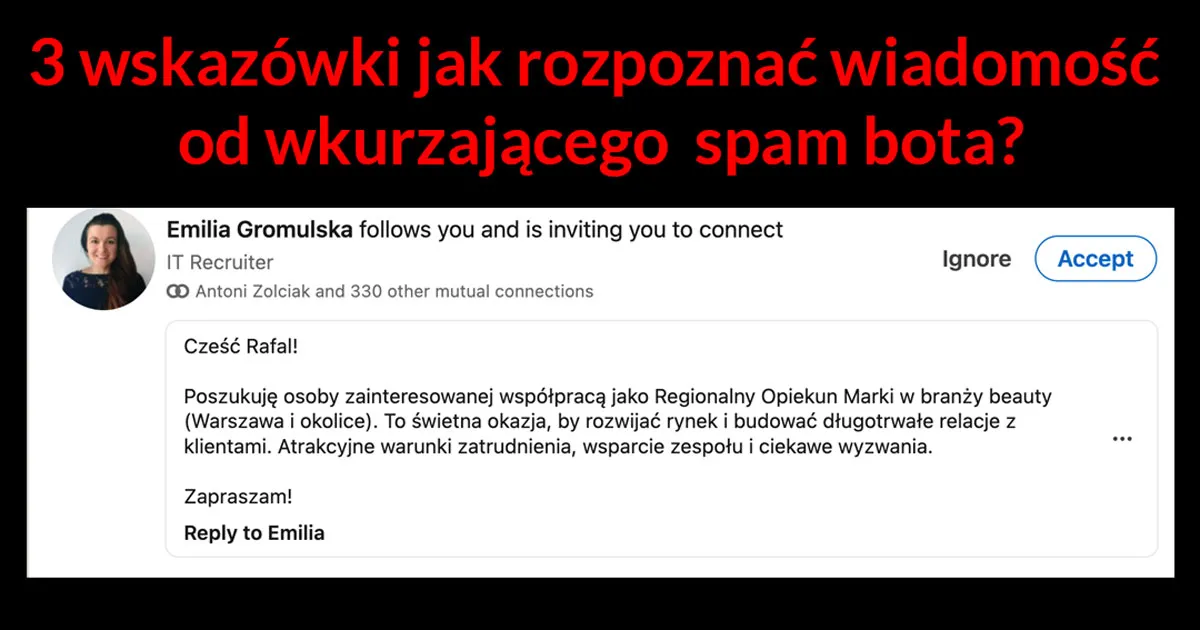
Nothing irritates me as much as untargeted spam — especially the kind generated by bots and poorly configured automation tools. Recently I received a recruitment message that immediately raised my suspicions. Let me walk you through what happened and, more importantly, how you can protect yourself.
My real example: a bot caught red-handed
I got a message that had all the classic signs of automated spam:
- Incorrect name — the bot called me “Rafał” but extracted it incorrectly from my English-language profile. This is a telltale sign of tools like LinkedIn Helper or Dux-Soup scraping profile data without proper character encoding.
- Zero personalization — no greeting, no introduction, no reference to my profile or work. Just a cold job offer template.
- Completely untargeted proposal — “Regional Brand Caretaker Beauty”? Nothing in my profile suggests interest in beauty industry roles. The bot clearly didn’t filter its target audience.
- Probable MLM scheme — the “opportunity” sounded less like recruitment and more like an attempt to pull me into a pyramid structure.
I reported the account. You should too — every report helps LinkedIn’s detection system improve.
The scale of the problem
The numbers are staggering. LinkedIn blocked or removed over 140 million fake profiles in 2024–2025. Their AI now catches 99.65% of fake accounts before users even report them. Yet with over 1 billion members, millions of spam messages still get through every month.
The situation has escalated with AI-generated profile photos. LinkedIn’s own research shows that most users cannot visually distinguish real faces from AI-generated ones. LinkedIn has developed detection tools that identify synthetic photos with 97% accuracy — but the arms race continues.
How to spot a fake LinkedIn profile
Here are the red flags I look for after years of training professionals on LinkedIn:
1. Profile photo issues
- No photo at all — an instant red flag. Real professionals almost always upload a photo (profiles with photos get 21× more views).
- Too perfect — AI-generated photos often have flawless skin, unnaturally symmetrical features, and blurred or inconsistent backgrounds.
- Reverse image search — right-click the photo and search Google Images. If it appears on stock photo sites or multiple unrelated profiles, it’s fake.
2. Suspicious profile content
- Keyword stuffing — profiles crammed with buzzwords like “AI | Crypto | Leadership | Blockchain | Innovation” without substance.
- Vague work history — real professionals list specific companies, roles, and dates. Fakes say “Entrepreneur” with no details or leave employment history blank.
- Brand new account — check “About this profile” (click the three dots on any profile). If created last week but claims 10 years of experience, something’s wrong.
3. Connection patterns
- Too few connections — fewer than 50 connections is unusual for anyone claiming professional expertise.
- Too many, too fast — a new account with 500+ connections but zero posts or endorsements suggests purchased connections.
- No mutual connections — if you share no connections with someone in your industry, approach with caution.
4. Messaging behavior
- Immediate pitch — real professionals build relationships before selling. A sales pitch in the first message is a red flag.
- Generic templates — the same message could have been sent to anyone. No reference to your specific work, posts, or profile.
- Broken formatting — template variables like {first_name} or {company} left unresolved, odd spacing, or mixed languages.
- Urgency and pressure — “This opportunity won’t last” or “I need your answer by tomorrow” are classic pressure tactics.
Common automation tools and how to detect them
Several tools are commonly used (and misused) for LinkedIn automation:
LinkedIn Helper — a desktop application (formerly a Chrome extension) with over 90,000 users. It runs as a standalone program simulating browser actions. Detection sign: repetitive message patterns and connections sent at machine-speed intervals.
Dux-Soup — a Chrome extension that navigates LinkedIn on your behalf. In February 2024, LinkedIn restricted 5 out of 8 accounts running Dux-Soup simultaneously, with “account under review” locks lasting 3–6 weeks.
Phantombuster — a cloud-based tool using modular “Phantoms” for scraping, connecting, and messaging. It runs on remote servers via headless browsers, not as a browser extension — making it harder for LinkedIn to detect directly, but leaving other traces (unusual IP addresses, action speed patterns).
The telltale signs of poorly configured automation:
- Messages sent at identical time intervals (real humans vary their timing)
- Hundreds of profile views in minutes (humanly impossible)
- Identical connection messages with only the name changed
- Connection requests from accounts with no content or engagement
What to do when you spot a fake account
- Don’t engage — don’t reply, don’t click any links in their messages
- Report the profile — click the three dots (⋯) on their profile → “Report/Block” → select “Fake account”
- Report the message — in the message thread, click three dots → “Report this conversation”
- Block — prevent them from contacting you again
- Warn your network — if a fake account is targeting your industry, post about it
How to protect your own account
- Enable two-factor authentication — Settings → Sign in & security → Two-step verification
- Review your privacy settings — limit who can see your connections list and email address
- Be selective with connection requests — accept only people you know, have mutual connections with, or who send a personalized note
- Check “About this profile” — LinkedIn now shows when a profile was created and whether phone/email is verified
- Use LinkedIn’s verification badge — verify your identity to build trust with your network
The bottom line
LinkedIn remains the most valuable professional network in the world — but only if we actively fight spam and fake accounts. Every report you submit helps LinkedIn’s AI improve. Don’t just ignore spam — report it.
And if you’re considering using automation tools for your own outreach: personalize your messages, respect people’s time, and never pretend to be someone you’re not. The line between efficient outreach and spam is thinner than you think.
Have you encountered fake profiles or spam bots on LinkedIn? Share your experience in the comments.
Want to protect your team from LinkedIn spam and teach them professional networking skills? Check out my LinkedIn training for companies — we cover profile security, spam detection, and effective outreach with 80% hands-on practice.