What Does Sends Mean on LinkedIn? (2026)
Sends on LinkedIn is a metric in post analytics that shows how many times people privately shared your post with others, typically in a direct message. Together with Saves (bookmarks) it is the first measurement of “dark social”: what happens in social media but isn't visible at first glance.

LinkedIn Sends in short
- You find LinkedIn Sends by going to your post, clicking View Analytics and checking the Social Engagement section.
- Saves show how many people bookmarked a post to return to it later, a signal of content useful for future reference, while Sends show that content is actively being circulated.
- In my view Sends are the strongest indicator of content that starts business conversations: a post with 10 sends and 5 likes is likely generating more pipeline value than a post with 200 likes and 0 sends.
- In one B2B Marketing.AI client's data, the post with the most sends (39) also collected the most saves (222), while the post with the best engagement rate (7.2%) had only 2 saves.
- One metric will not prove that Sends sell: Dreamdata's benchmarks count 76 touchpoints on average and 272 days from first touch to revenue, so last-click attribution tells you little.
- If a LinkedIn post gets high sends, create follow-up content on the same topic. A post with high impressions but zero sends is entertainment, a post with moderate impressions but high sends is a lead magnet.
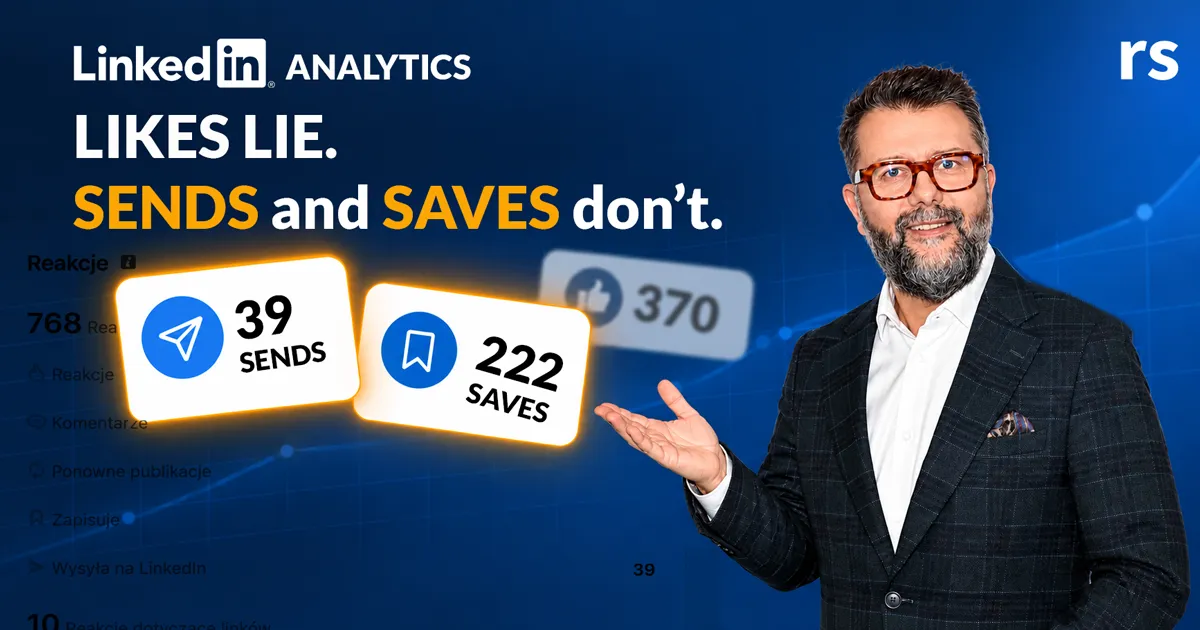
LinkedIn introduces “dark social” analytics. What is it and what does it mean for you?
Dark social is everything that happens in social media but isn’t visible at first glance. These are all the messages you sent to friends, all the links on WhatsApp with comments like: “Check this out, cool.”
Likes and comments are good for post visibility, but the real conversion happens when someone sends your post on the company Slack or in a DM saying: “Look, this person really knows the topic.”

So from today, you should see two new indicators in your analytics: “Saved” and “Sent”.
What does “Sends” mean on LinkedIn?
“Sends” on LinkedIn analytics measures the number of times users have privately shared your post with others, typically through direct messages (DMs). This metric indicates high-value content that sparks one-to-one conversations and professional recommendations, representing “invisible impact” beyond public likes or comments.
Key details about Sends on LinkedIn
- Private engagement: Unlike shares, likes, or comments, sends indicate that a user thought your content was relevant enough to pass on personally.
- Actionable insights: High send numbers indicate trust in your perspective and content that is deemed worth sharing privately.
- Distinction from saves: While “Saves” (or bookmarks) show that content is useful for future reference, “Sends” highlight content that is actively being circulated.
- Where to find them: You can view your “Sends” data by going to your post, clicking View Analytics, and checking the Social Engagement section.
What does “Saves” mean on LinkedIn?
“Saved” shows how many people found your post interesting enough to bookmark it so they can return to it later. This is a strong signal of evergreen, reference-worthy content — the kind of post people want to revisit when they need specific information or inspiration.
Sends vs. Saves vs. Impressions — what’s the difference?
| Metric | What it measures | Signal |
|---|---|---|
| Impressions | How many people saw your post in their feed | Reach and visibility |
| Likes / Reactions | Public approval, fast and easy engagement | Surface-level interest |
| Comments | Public conversation, deeper interaction | Thought provocation |
| Saves | Bookmarks for later reference | Evergreen value, utility |
| Sends | Private shares via DM | Trust, recommendation, conversion potential |
Sends are the strongest indicator of content that drives real business conversations. A post with 10 sends and 5 likes is likely generating more pipeline value than a post with 200 likes and 0 sends.
What our data shows: sends, saves and conversions
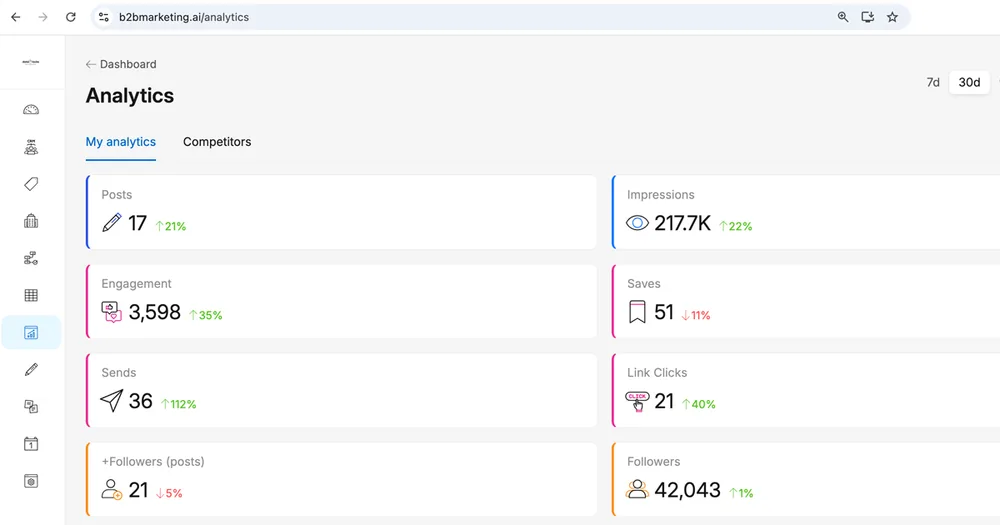
LinkedIn’s post analytics puts impressions, reactions and comments up front. Nice for the ego, but my clients know those are not the numbers that turn into business. That is why the LinkedIn analytics tool in B2B Marketing.AI shows, next to reach, the metrics closest to conversion: Saves, Sends, Link Clicks and the followers a post brought in (LinkedIn exposes that one through its API). In my view Saves, Sends and Link Clicks are the KPIs that matter most.
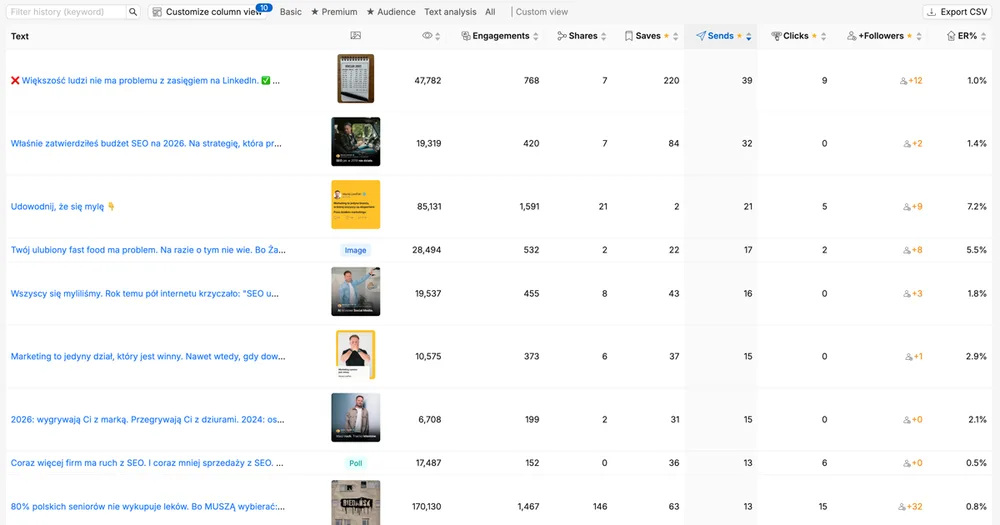
Here is the same client’s post table, sorted by sends. In this client’s case a link click is a click on a link to buy a training. The post with the most sends (39) also collected the most saves (222). The post with the best engagement rate (7.2%) had only 2 saves, and across these posts a high engagement rate went with fewer link clicks, not more.
Will one table prove that sends sell? No, and in B2B no single metric will. A buyer meets your brand dozens of times before asking for a meeting: Dreamdata’s benchmarks count 76 touchpoints on average and 272 days from first touch to revenue. So last-click attribution tells you little. What I can say is that my client and I see the same pattern: posts with many sends, saves and clicks are the ones that end up in sales conversations.
How to use Sends and Saves in your content strategy
- Identify high-value content: Focus on creating more content that drives sends — this often indicates stronger professional influence than mere visibility.
- Gauge true impact: Use this metric to understand how your content sparks behind-the-scenes conversations.
- Double down on what works: If a post gets high sends, create follow-up content on the same topic. Your audience is telling you this subject drives real action.
- Don’t chase vanity metrics: A post with high impressions but zero sends is entertainment. A post with moderate impressions but high sends is a lead magnet.
Why this matters for B2B and specific industries
These new analytical indicators are based on what LinkedIn announced over the past few months:
“Private user signals are more important than likes”
So this year we already have information about profile viewers and followers gained through posts, interactions with custom Premium buttons, and LinkedIn API Member Post Analytics.
I’m very happy about this direction because in some industries like coaching or career counseling, few people like posts for fear that someone will see, but many people save and share them. In executive search, sends finally enable conversion tracking since job seekers rarely liked recruiter posts. Now we’ll be able to measure this.
Source: LinkedIn post by Sam Corrao Clanon, Director of Product at LinkedIn
Comment on LinkedIn
Want your LinkedIn analytics to turn into B2B leads?
FAQ — common questions about LinkedIn Sends and Saves

About the author
Rafal Szymanski
I implement LinkedIn and Sales Navigator in companies so they turn a profit.
I've been training people in LinkedIn since 2016 — more than 3,700 of them, across 80+ B2B companies. Founder of B2B Marketing.AI, a CRM platform for advanced LinkedIn users. I help sales and marketing teams turn LinkedIn into a predictable source of leads. I've spoken about LinkedIn at the biggest conferences, including I Love Marketing, InfoShare and Effie, and picked up a few awards along the way.