LinkedIn Social Selling Index (SSI): What It Is, How to Check Your Score and How to Improve It
The Social Selling Index (SSI) is LinkedIn's score from 0 to 100 for how you use the platform to sell, built from four pillars worth up to 25 points each. My score is 65 against an industry average of 34, and since 8 September 2026 only accounts with a Sales Navigator license see the full report.

Social Selling Index in short
- The Social Selling Index counts activity on LinkedIn (profile, search, content, relationships), not results: none of the four pillars contains sales conversations or closed deals. LinkedIn itself admits that a high SSI does not always correlate with measurable sales outcomes.
- The four SSI pillars are Establish your professional brand, Find the right people, Engage with insights and Build relationships. Engage with insights reacts fastest: one post took mine from 5 to 9.7 points.
- You check your Social Selling Index at linkedin.com/sales/ssi while logged in. A free account sees only the message “You do not have access to SSI” there, and you should not buy a Sales Navigator license just for the report.
- LinkedIn does not publish a threshold for a “good” SSI score, so compare yourself with the industry average, not with 100. Among clients with a properly completed profile and some activity I usually see 50 to 60 points.
- You raise the SSI by completing your profile, publishing, saving decision makers to lists and sending them connection requests. I once pushed my score to 88 and nothing changed in my sales.
- The most useful part of the SSI report is the “People in your industry” card, which shows which industry the algorithm has assigned you to. Without a license you can check it in suggested posts and in the list of people who viewed your profile.
Update: free LinkedIn accounts no longer have access to SSI. Here is why SSI access was discontinued.
My Social Selling Index is 65 out of 100. The average in my industry is 34, so I am in the top 1% of my industry and the top 2% of my network. Sounds good? It does. Except that I once pushed that score to 88 and nothing changed in my sales. For years I have called it a vanity metric, and in this post I explain what the score actually measures and how to use it sensibly.
What the Social Selling Index (SSI) on LinkedIn is
The LinkedIn Social Selling Index, or SSI score for short, is a benchmark from 0 to 100 with which LinkedIn rates your activity on the platform from a sales point of view. LinkedIn itself describes it on its website as a measure of “how effectively a salesperson uses social media for social selling”: establishing a professional brand, finding the right people, engaging with insights and building relationships. You compare the score with people in your industry and with your own network. What social selling itself is, I cover separately in what is social selling.
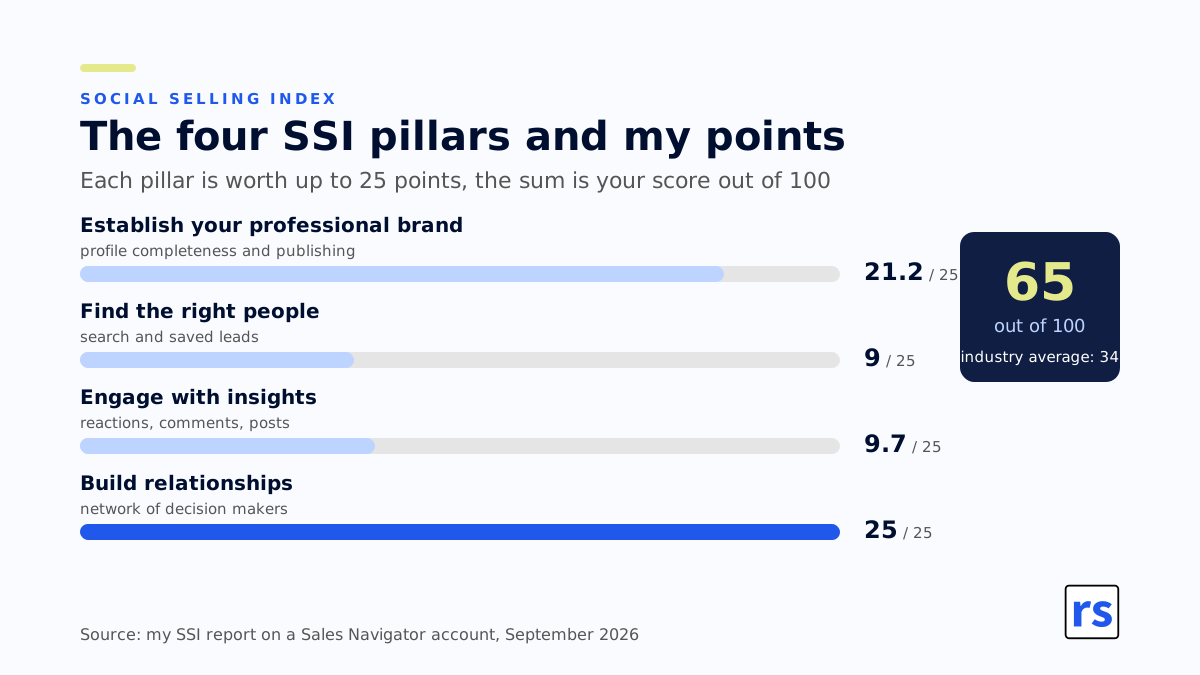
Where does the number come from? The SSI is based on four pillars, each worth up to 25 points, which LinkedIn adds up into the overall number. The index counts activity: what you have filled in on your profile, how much you search, how much you click and publish, who you connect with. It does not count results. None of the four pillars contains sales conversations or closed deals, and that is the first thing to know before you start reading it.
Who can see it? Until 2026, every LinkedIn user, for free. Now LinkedIn shows the full report only to accounts with a Navigator license, and a free account gets a message that its access has been discontinued. I documented it with screenshots from both accounts in the post about LinkedIn putting the SSI behind Sales Navigator.
The four pillars of the Social Selling Index
LinkedIn names them in English and those are the names you will see in the report. Here is what each of them measures and how my points look.
Establish your professional brand
Your professional brand, meaning how complete your LinkedIn profile is. LinkedIn checks whether the profile is filled in with the customer in mind and whether you come across as someone who knows the subject. I have everything filled in that can be filled in, and I have 21.174 out of 25. Why not 25? Because there is one field I will never fill in: which academic league I belonged to. If you are Polish and did not study at a renowned American or British university, you will not manage it either.
Remember: if you train someone on LinkedIn or you are just starting to work on the platform, you can use this pillar as a before-and-after measure. Empty accounts with no data usually sit at around 10 to 15 points, and after you add everything you can, it climbs to 20 or 21. Is it worth it? For LinkedIn, definitely, because it wants a lot of data in its database, preferably verified. After all, exactly that data is later sold back to you in Sales Navigator and Recruiter accounts.
Find the right people
Reaching the right people, meaning search. This pillar grows when you use advanced search, browse the profiles of decision makers and save leads, and it grows fastest for people with Navigator, because its search and lead lists are what gets counted here. I have 9 out of 25, even though I have used Navigator for years. I just do not do it as intensively as LinkedIn would like.
Remember: in an ideal world LinkedIn expects your network to consist of nothing but C-level managers, CEOs and board members, with every connection request accepted. In reality your network is your colleagues from work, and unless you are a famous CEO, those are not other CEOs. The pillar itself is easy to push by sending a lot of InMail messages, not just connection requests and ordinary messages.
Engage with insights
Engaging through content: reactions, comments, shares and your own posts. This is the pillar that reacts fastest. A week ago I had 5 points here, because I published nothing over the summer. I posted once, the post got well over ten thousand views, and the pillar jumped to 9.7. One post doubled it. Does that mean I was engaging badly before? No. It means I do not click on as much content as the platform would like, and I do not post every day to feed the algorithm.
Remember: here the algorithm counts quantity more than quality. I have not noticed, either on my account or on my clients’, that a large number of comments moved this pillar in any way, which is a pity, because then you could use it to measure employee activity on LinkedIn.
Build relationships
Building relationships, meaning your network, especially decision makers, and whether your connection requests get accepted, but above all what happens afterwards. That is the difference from “Find the right people”. I have 25 out of 25 here, because after two hundred companies trained, my network consists mostly of people who do B2B sales and marketing for a living, and as a rule I write welcome messages to new connections or simply use the Messages inbox in Navigator. Note: that is a different inbox from the one in your “regular” LinkedIn account.
How to check your Social Selling Index
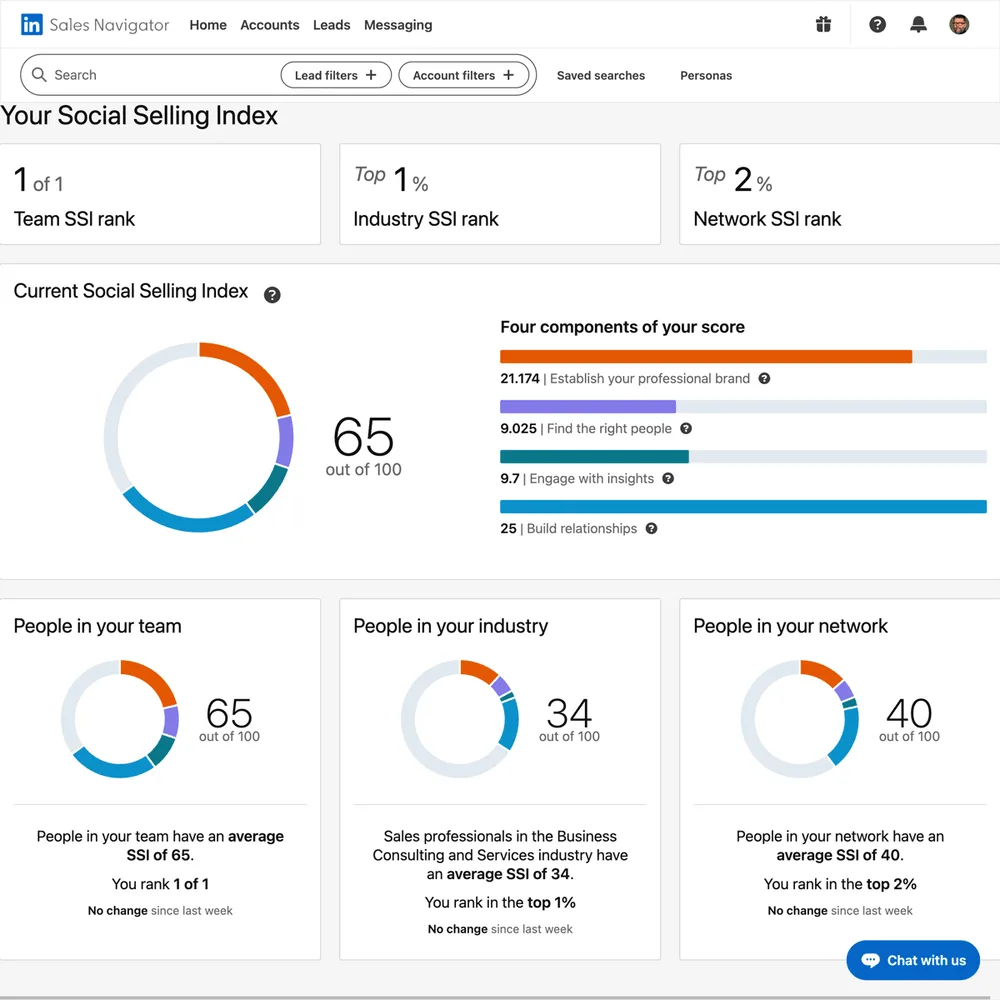
Go to linkedin.com/sales/ssi while logged in to your account. If you have a Sales Navigator license, you will see the full SSI dashboard:
- The overall score on a 0 to 100 scale.
- The split into four pillars, each with its own number of points.
- Three comparison cards: your rank in your industry, your rank in your network, and a line telling you which industry the algorithm has assigned you to.
And if you do not have a license? Instead of a score you see an empty dashboard and the message “You do not have access to SSI. Your access to the Social Selling Index (SSI) has been discontinued.” Until 8 September 2026 a red notice there said: “SSI is a Sales Navigator feature. Get Sales Navigator to retain access to SSI”. More on that in the last section.
The most useful thing in that dashboard is one sentence, and it is not the number. It is the “People in your industry” card, which makes it easier to see which industry LinkedIn has assigned you to. In my case: Sales professionals in the Business Consulting and Services industry. That same assignment decides who the algorithm shows your content to. I got burned by it myself: for years I added every university I lectured at to my profile, until the algorithm turned me into an academic lecturer and my reach collapsed. I described it in the post about how the LinkedIn algorithm works.
What is a good SSI score and how to read yours
LinkedIn does not publish any threshold for a “good” Social Selling Index score. There is no sentence in the report saying “above 70 you are good”. There is the average in your industry and your rank in it. In my industry the average is 34, so 65 puts me in the top 1%. Guides online quote 70 as the target, but that is a made-up number someone invented to sell “I will polish your LinkedIn profile and we will hack the LinkedIn algorithm” training. Bullshit, plain and simple. Among clients with a properly completed profile and some activity on LinkedIn I usually see 50 to 60 points.
So how do you read it? Against the industry average, not against 100. A high Social Selling Index in an industry where the average is 34 means only that you use LinkedIn more intensively than most people in your industry. It does not mean you sell more. You can have 75 points and sell nothing, and you can have 50 and a full pipeline.
LinkedIn promotes the index with research claiming that social sellers with a high SSI create 45% more opportunities and are 51% more likely to hit quota, as if the SSI correlates with sales success. Except that on the very same page where it describes the SSI today, LinkedIn also writes something else: “A high SSI score doesn’t always represent the efficacy of a sales person or correlate with measurable sales outcomes”. LinkedIn itself titled that page “From SSI to AI”. Which quote do you pick? I pick the second one, because it matches what I have seen at my clients for ten years.
How often does the index update? Guides claim it is updated daily. LinkedIn does not officially say, and in my experience it does not recalculate overnight: if you polish your profile today, the score will not jump tomorrow. It usually takes a few days.
How to improve your Social Selling Index, if you really have to
Can it be done? It can, and quite easily, because the index counts activity, and activity can be manufactured. I once pushed everything at the same time as an experiment and reached 88 out of 100. If you want to improve your score, this is what works on each pillar:
- Professional brand: complete your profile, with a photo, headline, About section, experience and skills, and publish regularly. You write the profile for the customer, not for a recruiter.
- Right people: use search, browse the profiles of decision makers at the companies you care about, and save them to lists. With a license this pillar grows fastest.
- Insights: react to other people’s posts, comment, publish your own. This is the pillar with the fastest reaction; one post took mine from 5 to 9.7.
- Relationships: send connection requests to decision makers and make sure they get accepted. Requests to random people will not help here. When someone accepts your request, or you accept theirs, always write a welcome message. You are not collecting CEOs in your network like rare Pokémon cards, you want to remember in a few months why you are connected with that person.
And now the question I ask everyone who wants a higher SSI: what for? If the number is meant to be an argument on a business card or in a training offer, then from 2026 only people with a license will see it anyway. If it is meant to be a measure of sales, it is not one. Above you have four actions that push the index up, but none of them is a conversation with a customer.
How to raise the SSI across a sales team
The same way as for one person, with one caveat. In sales teams the index works as a measure of one thing: whether the reps actually use LinkedIn and Navigator after the rollout. It measures behavior, so it will show you who searches, who publishes and who connects, and who got a license and never opened it. It is good for that. It only makes sense on the Core plan, though, because on the higher plans, such as Advanced, you have a whole admin panel that rates your reps’ activity on LinkedIn.
It is not good for measuring sales performance. If social selling is part of your sales strategy, measure the team by the number of sales conversations started from Navigator, the number of InMail replies, the conversion of connection requests sent into requests accepted, and the number of opportunities in the CRM. How to calculate that on your own data, with a control group, I described alongside the Sales Navigator pricing. The index itself served employee advocacy programs for years as a training slide, and that slide can go now. And if you are considering a social selling program, there are better KPIs, and I show them in my Social Selling training for B2B sales.
Does the Social Selling Index affect sales and reach
Sales: not directly. The actions that push the four pillars up can lead to sales if you do them sensibly, but the number itself sells nothing. That is why I replaced it, for myself and for my clients, with KPIs closer to sales, and when I need something closer to social media, I look at Saves and Sends in post analytics, because those two signals cost the reader something. I broke both down in the post about dark social analytics.
Reach: I know of no evidence that the index affects how many people see your posts. Reach depends on how the algorithm classifies your profile and how the first readers react, not on a number in a report. The only part of the report that helps with reach is the industry card I mentioned.
SSI only with a Sales Navigator license: what changed in 2026
For years the index was free because it did a marketing job: it showed a low number to someone who was supposed to conclude they needed a better tool. On 8 September 2026 LinkedIn rolled out the end of access for accounts without a license, after first writing on the SSI page that it is a Sales Navigator feature. So in my LinkedIn changelog the entry has moved from announcement to rollout. Inside Navigator its role has been taken over by Navigator Coach, a progress bar that congratulates you for knowing how to save a search.
What do you lose without the report? One thing: a convenient way to check which industry the algorithm has assigned you to. You can work around it without a license, with two free methods:
- Look at the suggested posts in your feed. LinkedIn labels them “Suggested”, and when you click, it explains why it decided the content fits you. If you see topics from a completely different industry, the algorithm has put you where you do not want to be.
- Go through the list of people who viewed your profile. If there is nobody from your market among them, something in your profile is sending the wrong signal.
And should you buy a license just to keep access to the report? No. Navigator makes sense because of its search, lead lists and alerts, and the SSI is an add-on, not an argument. How much the license costs and when it pays off, I calculated separately.
Summary: how to use the Social Selling Index sensibly
The Social Selling Index is a LinkedIn activity benchmark on a 0 to 100 scale, made of four pillars worth 25 points each, and today fully visible only with a Navigator license. Look at it once, to see which industry the algorithm has assigned you to, and compare yourself with the industry average, not with 100. If you have to raise it, you now know what to do: profile, search, content, connection requests. And measure sales effectiveness where the money is: in conversations, replies and opportunities in the CRM.
If you want to decide which metrics to use for social selling in your team, so that they have something to do with sales, book a consultation. We will go through your data and pick the ones that mean something.
PS: My SSI on the day this post goes live is 65. If it drops because I stop publishing again, I will not rescue it.
Frequently asked questions about the Social Selling Index

About the author
Rafal Szymanski
I implement LinkedIn and Sales Navigator in companies so they turn a profit.
I've been training people in LinkedIn since 2016 — more than 3,700 of them, across 80+ B2B companies. Founder of B2B Marketing.AI, a CRM platform for advanced LinkedIn users. I help sales and marketing teams turn LinkedIn into a predictable source of leads. I've spoken about LinkedIn at the biggest conferences, including I Love Marketing, InfoShare and Effie, and picked up a few awards along the way.