LinkedIn Sales Navigator Pricing 2026 and When It Pays Off
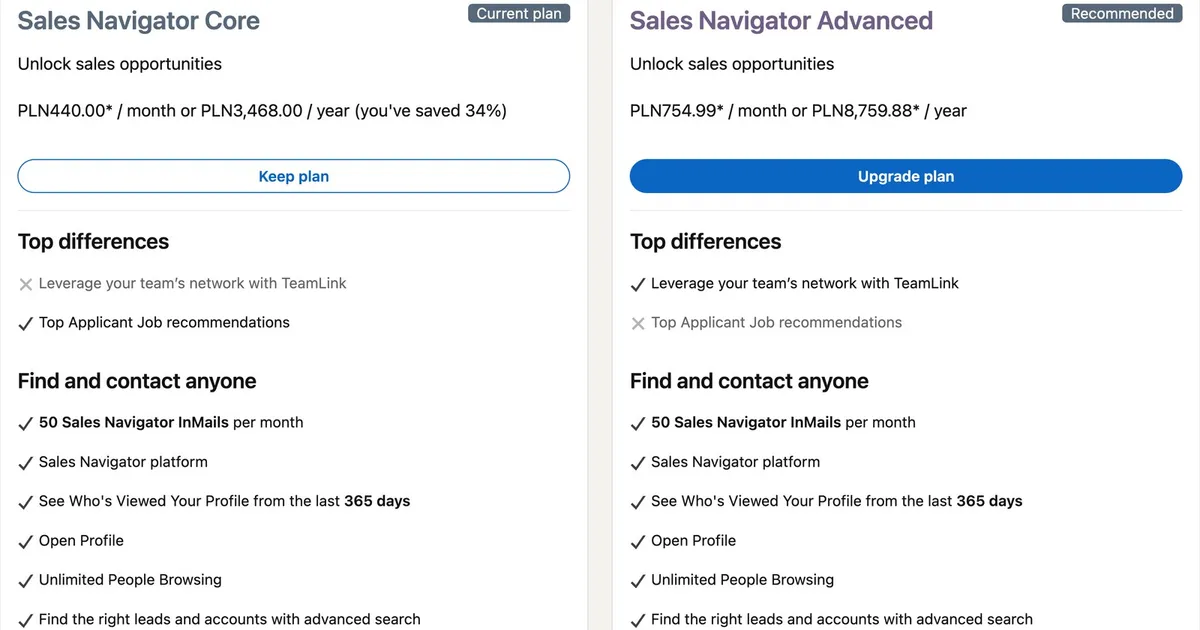
Sales Navigator costs from $119.99 a month for Core and from $159.99 a month for Advanced on LinkedIn's public price list, and Advanced Plus is quoted individually. On my Polish account Core is PLN 440.00 and Advanced PLN 754.99 a month, net of VAT. Prices checked on September 8, 2026.

Sales Navigator Pricing in short
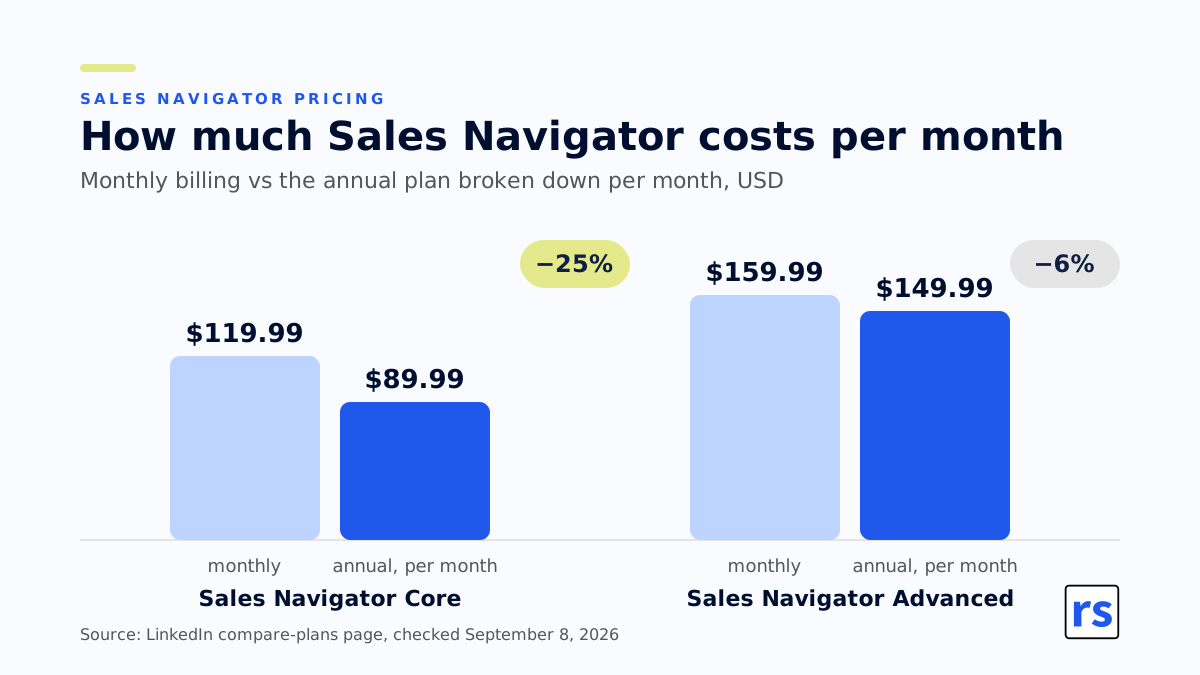
- Sales Navigator Core on annual billing costs $1,079.88 instead of $1,439.88 for twelve monthly payments, while Advanced costs $1,799.88 a year, only $120 less than twelve payments (LinkedIn's public price list, September 8, 2026).
- LinkedIn Premium will not replace Sales Navigator, because it has no advanced search or lead lists. Sales Navigator runs on its own interface, and every license has search with more than 50 filters and 50 InMail messages a month.
- Sales Navigator Advanced costs PLN 314.99 a month per person more than Core on my account ($40 in dollars) and adds shared lists, TeamLink, Buyer Intent and team reporting. The extra cost makes sense when the team shares lists and searches, and full CRM integration comes only with Advanced Plus.
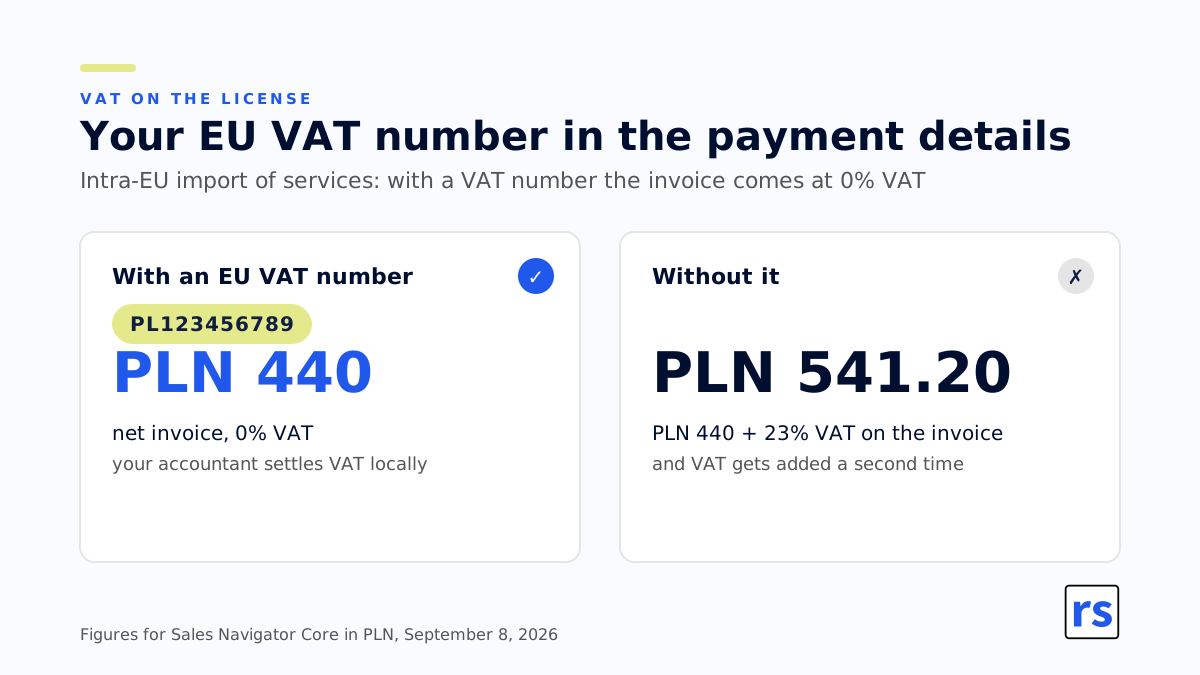
- If your company is in the EU, enter your EU VAT number in the payment details, for example PL123456789, and LinkedIn invoices Sales Navigator at the net price with 0% VAT. Without it a Polish company gets an invoice for PLN 541.20 instead of PLN 440 (23% VAT), and the accountant adds VAT a second time.
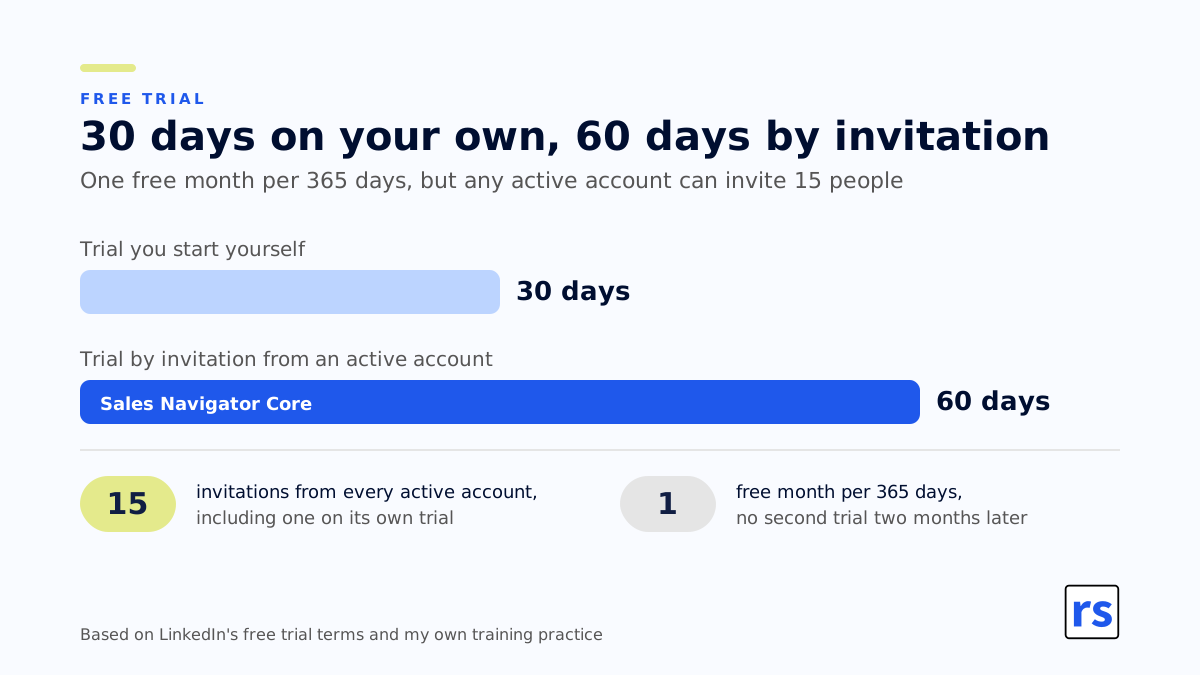
- A self-started Sales Navigator free trial lasts 30 days, and every active account, even one on its own trial, can invite 15 people to a 60-day Core trial. You will not get a trial if you already have a paid LinkedIn subscription (Premium counts) or used one in the past 365 days.
- Measure the return on Sales Navigator after a quarter: give licenses to a small group of reps, keep a control group working the old way, and compare the number of opportunities in the CRM and time to close.
What is Sales Navigator? LinkedIn Sales Navigator is LinkedIn’s sales intelligence tool for lead generation, prospecting and building business relationships, sold separately from a basic LinkedIn account and from LinkedIn Premium. You get advanced lead and company search with filters, lead and account lists, and alerts. For social selling in B2B it is the core tool for individual sellers and sales teams. For job hunting or recruiting, not so much. I cover it in more depth, with first steps, in my guide what is LinkedIn Sales Navigator.
Before I sat down to write this, I opened the plan switcher on my own account and took a screenshot. I have Sales Navigator Core and wanted to see what LinkedIn wants from me for moving up to Advanced. It wants PLN 754.99 a month. Why start with a screenshot and not a table? Because LinkedIn’s price list changes a few times a year, the zloty price is not a conversion of the dollar price, and for Advanced Plus there is no price at all. Every number below has a date and a source.
How much does Sales Navigator cost: prices checked on September 8, 2026
I have two sources. The first is LinkedIn’s public compare-plans page on business.linkedin.com. It lists prices in dollars, euros and a few other currencies, and the footer says “Updated: Aug 1, 2026”. The second is the plan switcher on my own account. It shows prices in Polish zloty, net of VAT.
| License | Currency | Monthly | Yearly |
|---|---|---|---|
| Sales Navigator Core | USD | 119.99 | 1,079.88 |
| Sales Navigator Core | EUR | 120.99 | 1,088.88 |
| Sales Navigator Core | PLN (net) | 440.00 | 3,468.00 |
| Sales Navigator Advanced | USD | 159.99 | 1,799.88 |
| Sales Navigator Advanced | EUR | 148.21 | 1,693.88 |
| Sales Navigator Advanced | PLN (net) | 754.99 | 8,759.88 |
| Sales Navigator Advanced Plus | any | individual quote | individual quote |
Prices checked on September 8, 2026. The dollar and euro figures are “from” prices on LinkedIn’s price list, and the page itself says they are estimates that may exclude VAT. The zloty figures come from my account and are net prices, VAT comes on top (how to handle it is below). The same page also quotes Australian and Canadian dollars and pounds: Core at A$154.99, C$144.99 and £94.99 a month, Advanced at A$189.99, C$179.99 and £130.00 a month. And Advanced Plus? No figure. The price depends on team size, CRM integration and onboarding, and to get it you book a demo with a LinkedIn sales rep.
How much does annual billing save? On Core, a lot. LinkedIn quotes 25% on the public page and prints “you’ve saved 34%” next to my license. In dollars: twelve monthly payments of $119.99 add up to $1,439.88, the year up front costs $1,079.88. On Advanced, almost nothing: twelve payments of $159.99 add up to $1,919.88, the year costs $1,799.88, a difference of $120, which LinkedIn calls 6%. On my account in zloty it is even thinner, exactly PLN 300 for the year. Per month, the annual Core plan works out at $89.99 instead of $119.99 (PLN 289 instead of PLN 440), and Advanced at $149.99 instead of $159.99. So buying Advanced annually locks you in for twelve months for a $120 discount. There is one more thing the price list does not show: with an active annual license, the price stays fixed at renewal. I have been paying PLN 2,860 a year for Sales Navigator Core for many years, while new buyers see PLN 3,468 today.
VAT on Sales Navigator: enter your EU VAT number before you pay
If your company is in the EU (mine is in Poland), the license is an intra-EU import of services. What follows from that? When you fill in the payment details, enter your EU VAT number, meaning the number with the country prefix and no spaces, for example PL123456789. LinkedIn verifies it and issues the invoice at the net price with 0% VAT, and your accountant applies the correct VAT under the reverse-charge rules. If you skip it, LinkedIn adds VAT to the invoice, in Poland 23%, so PLN 541.20 instead of PLN 440. Your accountant will still have to treat that invoice as if it were a net price and add VAT a second time. A lot of people get burned by this, and the finance team is not happy about paying VAT twice.
Sales Navigator vs LinkedIn Premium: not the same thing
This mix-up costs the most money, because it leads to buying the wrong product. LinkedIn sells several paid plans at once: Premium Career, Premium Business, Sales Navigator and Recruiter Lite for recruiters, and they all sit in the same “Upgrade plan” switcher. That is why people casually call every paid LinkedIn subscription “Premium”, although there is no LinkedIn product called Premium Sales Navigator.
- LinkedIn Premium is a package for a single user built around visibility: the full list of people who viewed your profile, LinkedIn Learning, a pool of InMails. Career is aimed at job seekers, Business at business contacts.
- Sales Navigator is a prospecting tool and runs on its own interface. Its heart is a search engine with more than 50 advanced search filters, saved lead and account lists, and alerts about changes at the people and companies you follow.
The biggest difference is the feature set: Premium will not give you advanced search or lead lists. If you are buying it for prospecting, you are buying the wrong product. It works the other way too: Navigator is not there to boost your profile’s visibility, although you do get the list of who viewed your profile in the last 365 days as part of the package.
There is one thing in all this I do not understand. The switcher on my account shows that Core includes LinkedIn Learning. LinkedIn Learning means more than 25,000 courses and interview preparation tools, and Advanced does not have it. Why does a salesperson on SN Core get to practice job interviews while their manager on Advanced does not? No idea. That is how LinkedIn packaged it.
How much does LinkedIn Premium cost? I do not list Premium Career or Premium Business prices here, because I have not checked them on my own account the way I checked Navigator’s. A separate post on that is coming. If you are considering the Career or Business plan, check the figure in your own plan switcher, because Premium pricing depends on the billing country. One thing I can say: the Premium features people usually buy it for (who viewed your profile, Open Profile, InMails) are already inside your Sales Navigator subscription.
Sales Navigator features: what you get in Core, Advanced and Advanced Plus
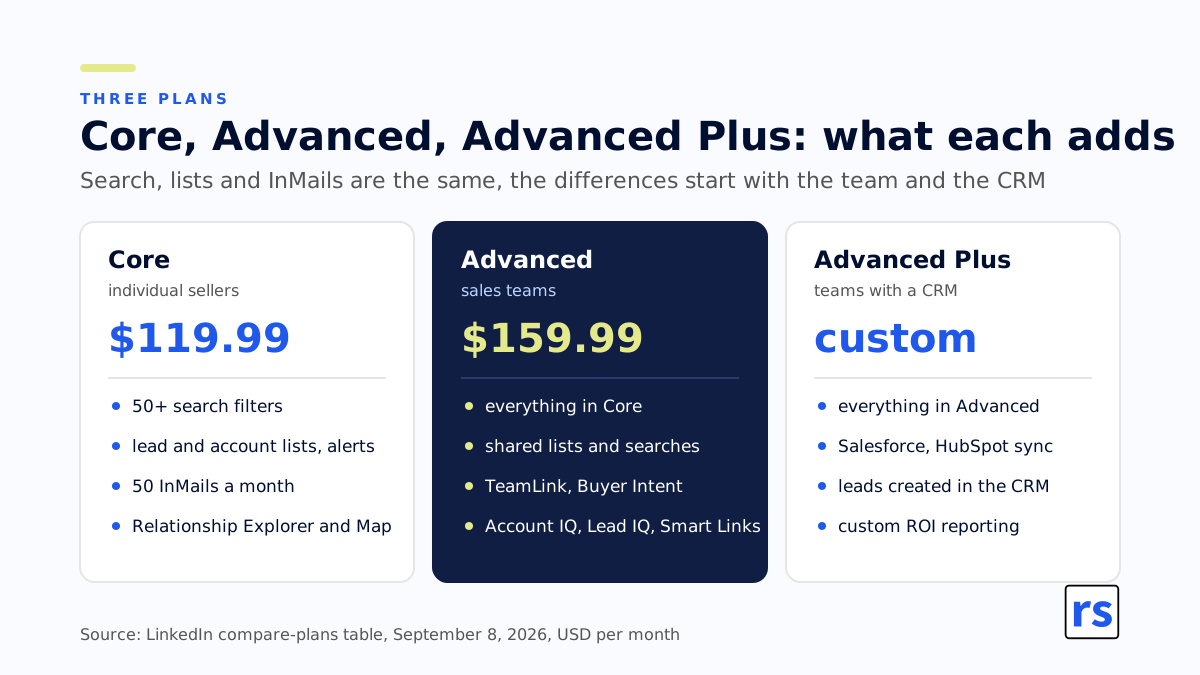
Spoiler: the search engine, the lists and the InMails are the same in all three licenses. The differences start with teamwork, AI and CRM.
| Feature | What it does | Core | Advanced | Advanced Plus |
|---|---|---|---|---|
| Advanced Search | more than 50 advanced search filters for leads and accounts | ✅ | ✅ | ✅ |
| InMail | messages to people outside your network | 50/mo | 50/mo | 50/mo |
| Lead and account lists, alerts | save people and companies, get alerts on job changes and new posts | ✅ | ✅ | ✅ |
| Lead and account recommendations | suggestions of more people and companies for your lists | ✅ | ✅ | ✅ |
| Relationship Explorer | points to the right people at an account based on mutual connections and interest signals | ✅ | ✅ | ✅ |
| Relationship Map | an org chart of the account with alerts on key people and gaps in the buying committee | ✅ | ✅ | ✅ |
| Who’s Viewed Your Profile | who viewed your profile in the last 365 days | ✅ | ✅ | ✅ |
| Open Profile, unlimited browsing | anyone can message you without a connection; no profile browsing limit, access to 2nd and 3rd degree networks | ✅ | ✅ | ✅ |
| LinkedIn Learning, interview prep | more than 25,000 courses, interview preparation tools, job recommendations | ✅ | ❌ | no data |
| Shared lists and shared searches | one person builds a list or a search, the whole team uses it | ❌ | ✅ | ✅ |
| TeamLink | warm introductions through the whole team’s network | ❌ | ✅ | ✅ |
| Buyer Intent | signals that someone at a followed account is showing interest in your company | ❌ | ✅ | ✅ |
| Account IQ, Lead IQ | AI-generated summaries of a company and a person | ❌ | ✅ | ✅ |
| Message Assist (public beta) | AI drafts the first version of a message | ❌ | ✅ | ✅ |
| Smart Links | tracked links to your materials, you see who opened what | ❌ | ✅ | ✅ |
| Team reporting | rep activity in the admin panel | ❌ | ✅ | ✅ plus custom ROI reporting |
| License management, consolidated invoice | the admin assigns and revokes licenses on the fly and names a payer who gets one invoice | ❌ | ✅ | ✅ |
| Book of business | upload your customer list so recommendations and alerts cover your accounts | ❌ | ✅ CSV upload | ✅ CSV and CRM import |
| Dedicated account team and training | onboarding and training from LinkedIn | ❌ | ✅ if purchased through a LinkedIn sales rep | ✅ |
| CRM integration | two-way sync with Salesforce, HubSpot, Microsoft Dynamics and Oracle | ❌ | partial, HubSpot and Microsoft Dynamics only | ✅ full |
| Lead and contact creation in CRM | save to the CRM straight from Navigator, no retyping | ❌ | ❌ | ✅ |
| Navigator embedded in the CRM | Navigator data visible inside the CRM | ❌ | ❌ | ✅ |
| Lead IQ in the CRM (since September 2026) | AI lead summary in the Navigator view inside the CRM, for now only when LinkedIn is set to English | ❌ | ❌ | ✅ |
| Alerts in Microsoft Teams (since September 2026) | alerts about new, promoted and departing decision makers in a Teams chat, excluding people in the EEA, Switzerland and the UK | ❌ | ❌ | ✅ |
| Signals in LinkedIn notifications (since September 2026) | a saved lead’s promotion, a senior hire at a saved account, new saved search results | ✅ | ✅ | ✅ |
Source: the compare-plans table on business.linkedin.com and the plan switcher on my account, both from September 8, 2026. I leave the Advanced Plus column for LinkedIn Learning empty because the switcher only compares Core with Advanced. Partial CRM sync on Advanced comes from my own practice: it works only with HubSpot and Microsoft Dynamics and is not as complete as on Advanced Plus. The three rows marked “since September 2026” come from the Sales Navigator release notes of September 22, 2026, and I cover them in the post on Sales Navigator 2026 features.
Sales Navigator Core
The single-user version, the plan LinkedIn labels “best for individual sellers”, and my own plan. What do you get? A search engine with more than 50 advanced search filters for leads and accounts, saving leads and accounts to lists, recommendations of more leads, alerts on job changes and new posts from the people you follow, and 50 InMail messages a month. That search naturally reaches LinkedIn profiles outside your own network, 2nd and 3rd degree, plus fully hidden profiles you can unlock with a limit of 25 credits. On top of that Relationship Explorer (points to the right people at an account based on mutual connections and interest signals) and Relationship Map (an org chart of the account with alerts on key people). There is also unlimited profile browsing, access to your 2nd and 3rd degree networks, and the list of who viewed your profile in the last 365 days. For a salesperson with their own book of customers this is enough, because they do not have to share lists with anyone. The Core plan bills monthly to whatever card you attach, it does not have to be yours. LinkedIn does not email the invoice, you download it yourself.
Sales Navigator Advanced
Everything in Core plus the team layer, the plan LinkedIn sells to sales teams. The most important part of it, in my opinion, is sharing: shared lead and account lists and shared searches, so one person builds a proper search and hands it to the whole team instead of dictating filters over the phone. I described it in the post about sharing account searches. On top of that:
- warm introductions through the whole team’s network, not just yours (TeamLink);
- signals that someone at a followed account is showing interest in your company (Buyer Intent);
- AI-generated summaries of a company and a person (Account IQ and Lead IQ) and help with writing messages (Message Assist, public beta);
- tracked links to your materials that show who opened what (Smart Links);
- team activity reporting, license management and consolidated billing under one account;
- uploading your own customer list from a CSV file, so recommendations and alerts cover your accounts, not random ones.
When should you move from Core to Advanced? On my account the difference is PLN 314.99 a month per person, in dollars $40. I see companies handing reps several Core licenses because they are cheaper than Advanced. If the team is supposed to share lists and searches, the extra cost makes sense, but with reps each working their own book there is nothing to pay for. One more thing from LinkedIn’s FAQ: you can buy up to five Advanced licenses yourself from your account, a bigger team goes through a LinkedIn sales rep.
There is also a difference that is not in LinkedIn’s table but shows up in accounting. On Core you generate the invoice yourself, one month in advance. On Advanced and Advanced Plus the license admin assigns a subscription payer account, meaning the person who pays for the licenses, usually someone in finance or marketing who owns the budget. That person gets one consolidated invoice for all licenses. Licenses are assigned and revoked on the fly in the admin panel, so you do not have to allocate one to an employee a month in advance and you can rotate them within the team.
Sales Navigator Advanced Plus
Everything in Advanced plus CRM. LinkedIn lists sync with Salesforce, HubSpot, Microsoft Dynamics and Oracle, creating leads and contacts in the CRM straight from Navigator, and importing your book of business from the CRM instead of a file. Add Navigator embedded inside the CRM and ROI reports tailored to the company. Since September 2026 Advanced Plus also gets alerts in Microsoft Teams and Lead IQ in the CRM, with two limits that matter in Europe: Teams sends no alerts about people in the EEA, and Lead IQ only works when LinkedIn is set to English. When does it make sense? When the team actually uses the CRM rather than treating it as a graveyard of half-filled records. There is no list price. Advanced Plus pricing is custom, quoted per company and negotiated.
What changes how much you pay for Sales Navigator
The figure in the table is a starting point, not always the end point. What moves it?
- Annual vs monthly billing: on Core the annual plan is a quarter to a third cheaper, on Advanced you save $120 (or PLN 300) a year.
- VAT: the zloty figures are net. With an EU VAT number in your payment details you get a 0% VAT invoice and settle VAT locally, without it LinkedIn adds local VAT, in Poland 23%, and Core costs PLN 541.20 instead of PLN 440.
- Renewal: with an active annual license the price stays fixed at renewal. My PLN 2,860 for Core has held for years.
- Currency and billing country: Sales Navigator pricing varies by billing country. LinkedIn itself says the quoted figures are estimates, subject to change, and may even differ between device types, and the zloty price is not a plain conversion of the dollar price.
- Number of licenses: up to five Advanced licenses you buy from your account, above that you talk to a LinkedIn sales rep, and on Advanced Plus the price is negotiated by definition.
- Refunds: LinkedIn’s FAQ says it does not offer refunds except where local law requires it. Picking the wrong annual plan therefore costs a full year.
Sales Navigator free trial: how to use it
You can get a Sales Navigator free trial of both Core and Advanced. If you start it yourself, it runs for 30 days. Three things from the fine print before you click: LinkedIn requires a credit card, sends a reminder email 7 days before the trial ends, and rolls you into a paid subscription if you do not cancel. Who does not get one? Anyone who already has a paid LinkedIn subscription (Premium counts) or used a trial in the past 365 days. So you cannot start a trial, cancel after a month and start another one two months later. One free month a year, that is it.
There is, however, a smart way to lower the cost of Sales Navigator for a sales team. Every active account, even one on its own 30-day trial, can invite 15 people to a 60-day Sales Navigator Core trial. I use this at my Sales Navigator training sessions: one person has a paid account, the rest of the group gets invitations from them and practices on a full license for two months. Two months instead of one, and the company pays for one license.
Most people waste the trial on clicking around. To get a conclusion out of it, go in with a task ready:
- Before you start, write down 20 companies that are your ideal customer. Not “the IT industry”, actual names.
- Build one account search that finds those names and check how many of your twenty show up in the results. This tests whether your customers can be described with filters at all.
- Save the list and watch it for the whole trial. The alerts will show you how much is happening in your segment.
- Count how many contacts from that list you managed to warm up. Not how many messages you sent, but how many conversations started.
If after this test your twenty cannot be caught with filters, you have just saved yourself a $1,079.88 annual subscription.
Is Sales Navigator worth it? How to measure the return
LinkedIn writes on its pricing page that, according to Forrester, Sales Navigator pays for itself in six months (“Forrester found Sales Navigator pays for itself in six months”). Maybe so, but that quote hangs on the vendor’s own website, and I prefer to calculate on my own data. How? With the method I use with clients and described in the post about the algorithm and B2B sales:
- Do not roll the license out to everyone at once. A hundred licenses “just because” is the easiest way to never find out whether the tool works.
- Set up a small group of reps with Navigator and keep a control group working the old way.
- After a quarter, compare both groups on ordinary business KPIs: the number of opportunities in the CRM and time to close.
- Calculate the return. You know the cost of an employee, you know the cost of a license ($119.99 or $159.99 a month per head), you know whether the deal got done.
That is a plain A-to-B comparison any good head of sales can run without a Forrester report.
How to cancel Sales Navigator or LinkedIn Premium
You cancel in your account settings, in the plan management section. LinkedIn Premium is cancelled the same way. When do you stop paying? On annual billing the cancellation takes effect at the end of the paid year, on monthly billing at the end of the current month, so you keep access until then. Two things from LinkedIn’s FAQ that people forget:
- when the license expires you permanently lose saved leads, saved accounts, InMail message history and unused InMail credits;
- InMail credits expire after 90 days anyway, so “saving them up” for later makes no sense.
So before you click “cancel”, move your saved lead and account lists out of the tool, into the CRM or at least a spreadsheet.
Summary: how much Sales Navigator costs and whether it is for you
That is Sales Navigator pricing in 2026. Sales Navigator Core costs $119.99 a month or $1,079.88 a year (on my Polish account PLN 440.00 net a month or PLN 3,468.00 a year), Advanced $159.99 a month or $1,799.88 a year (PLN 754.99 or PLN 8,759.88), and Advanced Plus whatever you negotiate. In the EU, VAT comes on top and you settle it yourself if you entered your EU VAT number. Is that expensive? It depends on whether your customers can be described with filters and whether anyone in the company actually uses the tool. So the question “how much does it cost” matters less than “how will I check that it pays off”, and for the second one you have a ready method above.
If you want your team to learn to squeeze out of this license what you are paying for, I run Sales Navigator training for B2B teams. 80% of the time is exercises on your team’s own accounts and real leads.
PS: When the price list changes, I will update the table and the date above it. If the plan switcher on your account shows different figures than mine, let me know and I will add them.