Personalized Onboarding in Sales Navigator: Four Questions to Start With
A new Sales Navigator user answers four questions: goal, product, ideal customer and target accounts. Lead recommendations and alerts depend on those answers. LinkedIn is rolling this out gradually and is not quite sure itself who gets it, but it is definitely an important change. Below I explain why.

Rafal Szymanski
I implement LinkedIn and Sales Navigator in companies so they turn a profit.
I've been training people in LinkedIn since 2016 — more than 5,000 of them, across 200+ B2B companies. Founder of B2B Marketing.AI, a CRM platform for advanced LinkedIn users. I help sales and marketing teams turn LinkedIn into a predictable source of leads. I've spoken about LinkedIn at the biggest conferences, including I Love Marketing, InfoShare and Effie, and picked up a few awards along the way.
Published On
In this article you’ll find a description of the personalized onboarding in Sales Navigator that LinkedIn announced on September 22, 2026: what the tool asks at first login, how to answer so that lead recommendations and alerts make sense, where to change your answers later, and why nobody is quite sure who gets this feature.
I have a feeling that LinkedIn, by rolling out one seemingly small feature after another, is actually doing its homework and has listened to users. Until now, every person I trained on Sales Navigator who already had it set up told me that after buying it they clicked through onboarding any old way, just to start working with the tool as fast as possible. That’s a big mistake, and it ended with complaints like “Stupid LinkedIn, suggesting bad leads”. And all of it comes down to goals that were badly defined at the start.
In this article you'll learn:
- which four questions Sales Navigator asks at first login;
- how to describe your product and ideal customer so recommendations hit the mark;
- what to do if you don’t have a list of target accounts;
- where to change your answers after setup;
- why availability across plans is unclear.
What is personalized onboarding in Sales Navigator
It’s a short setup a new user goes through at first login. Sales Navigator asks about your goal, product, ideal customer and target accounts, and then tailors lead recommendations, their ranking, alerts and guidance to your answers. LinkedIn says the same preferences will power search and AI features. That future tense puzzles me, because according to the documentation they should already be feeding the results.
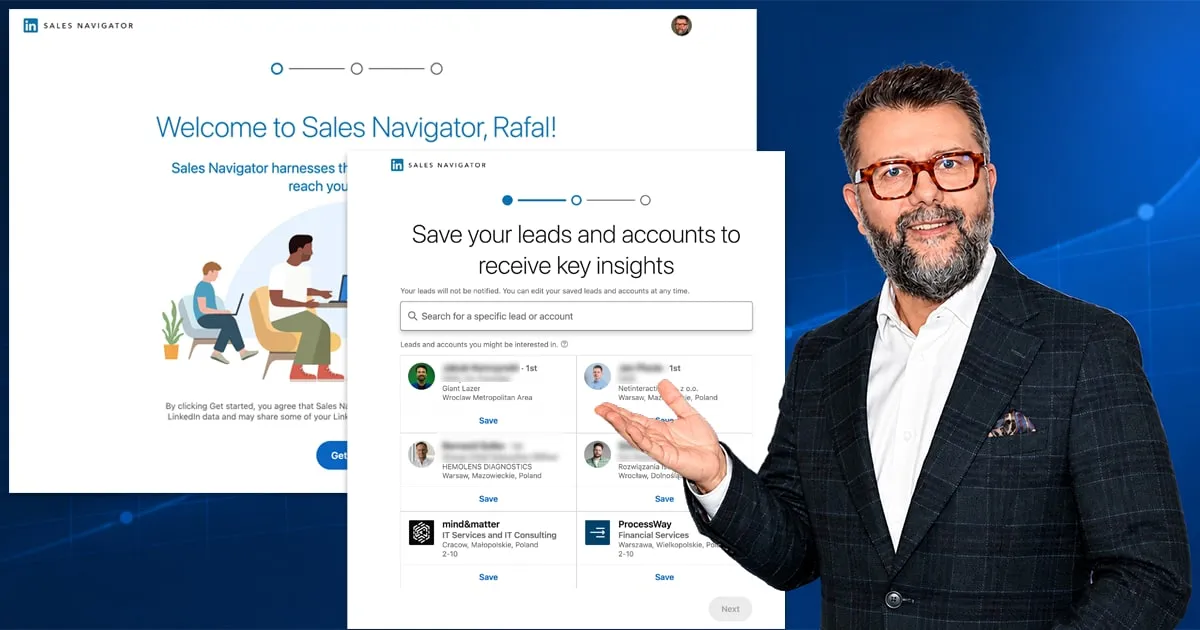
Why onboarding at all, and what did it look like until now? Just like in the image illustrating this article: a new user had 3 clicks in onboarding before they could start using the app, and those 3 clicks meant naming three people or three companies. With no explanation of why or by what criteria they should do it, users clicked anything just to move on. Based on those choices, the app built a first search with a C-Level + Director filter. Unfortunately the results were always poor, because the SISO rule applied, or to put it bluntly, Shit In, Shit Out.
Nobody explained whether we should focus on existing customers, look for new ones or do something else, what we sell or to whom. That’s why most of the leads picked were random.
Which four questions Sales Navigator asks during onboarding
LinkedIn’s documentation lists them in this order:
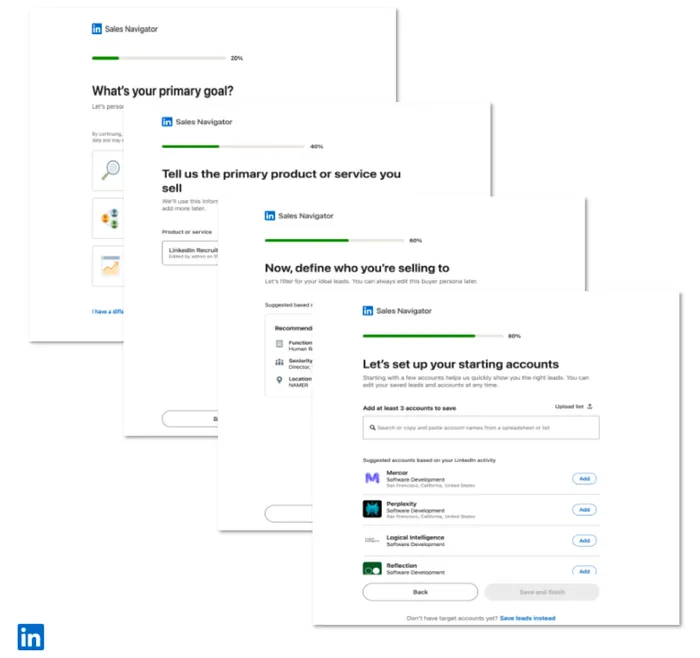
- Primary goal. You choose between “Find and win new business” (new customers, outbound sales), “Grow current accounts” (expanding existing customers), “Do both” or “I have a different goal”. I’m really curious what they mean by that other goal, but maybe they noticed that SN can be used for more than B2B sales. I keep recommending it to recruiters, because a Core account gives you more search options than Recruiter Lite at a similar price. Hook it up to smart automation and data enrichment and you get 99% of the functionality of a full Recruiter account at a tenth of the price.
- Product or service. You pick a product added earlier by your admin or add your own: name and website, then “Analyze website”, and Sales Navigator suggests a description and category for you to edit. Take a look at my guide on how to define a product in the LinkedIn environment and why it matters so much, and not only from a seller’s point of view.
- Ideal customer persona (ICP). The tool suggests criteria based on your product, and you can change them in four fields: function, seniority level, current job title and geography. At least one field has to be filled in. It’s a nice change, because right now you have to define a persona yourself and it isn’t tied to your product.
- Target accounts. At least three, entered by hand or uploaded from a CSV file if your plan is higher than Core. You can also pick an existing account list if you have one defined in Accounts and are just restarting the setup.
How do you answer so it makes sense? The product description from the website analysis is a starting point, not a finished answer, because the persona suggestions in the next step depend on it. I think explaining how to do it properly deserves a separate guide. It’s part of my Sales Navigator training and takes over an hour, but in short I believe it’s better to work on narrow markets (vertical accounts in ABM terms) and narrowly defined personas, and to keep a few of them for testing. The typical mistake I see is defining the market and personas broadly, following the rule: “Who is your customer? Anyone who buys.” That’s a mistake.
What to do if you don’t have a list of target accounts
Click “Save leads instead” at the bottom of the last screen. Instead of three companies you then save individual people, and Sales Navigator builds recommendations from them. Personally I prefer this route, because it gives you a narrower group of similarly defined people. Usually the decision maker and getting to them matter more than just anyone from a matching company.
Is it the worse route, as LinkedIn claims? Sales Navigator itself describes an account list as a way to show you the right leads faster, so without it recommendations have less to work with, but I disagree. There are few products that every company uses in a similar way, with everyone in that company using them the same way. Unless your name is Microsoft and besides LinkedIn you also have Office, which everybody uses. If you’re not Microsoft, make your first selection fairly narrow.
Can you change your answers later
Yes. You can change the preferences from setup in your Sales Navigator settings, so a badly described product doesn’t stay with you forever. You change it in the settings under this link.
One caveat applies to team plans, meaning Advanced and Advanced Plus: the admin can block users from adding products or define them centrally. In that case, in step two you only pick from the list the admin prepared, and if your product isn’t there, you have to ask them to add it. In general I think that on these plans it’s better for the admin to define the product, because it will then be the same for every user on the contract.
Who has the new personalized onboarding
Here LinkedIn contradicts itself. The availability table in the September 2026 release notes ticks all three plans, Core included. The description of the same feature a few paragraphs earlier says it’s only available on Advanced and Advanced Plus bought through a LinkedIn account representative. And the help article adds that the setup is being rolled out gradually, so you may not have it yet.
How do you check? If you don’t see the “What’s your primary goal” screen at first login, the feature isn’t on your account yet and you start working as before. If you’ve had Sales Navigator for a long time, you’re unlikely to see that screen, because it’s tied to the first login. But I have a trick for that: you can force onboarding again on an old account that’s already set up by going to this link.
A full overview of the September update, including a table of availability by plan, is in my post on what’s new in Sales Navigator in 2026. In my Sales Navigator training we set up the persona, product and account lists on your own account, whether or not LinkedIn has shown you the new onboarding yet.
Sources
Frequently asked questions about Sales Navigator onboarding
Maybe we can do something together?
If you like what I write, maybe I can write something for you?