Lead IQ in Your CRM: Sales Navigator's Lead Summary Without Leaving the CRM
Since September 2026 Lead IQ, the AI-generated lead summary from Sales Navigator, shows up right inside your CRM. As usual there are catches: you need Advanced Plus with CRM Sync, plus one condition that is easy to miss outside English-speaking markets, namely LinkedIn set to English.

Rafal Szymanski
I implement LinkedIn and Sales Navigator in companies so they turn a profit.
I've been training people in LinkedIn since 2016 — more than 5,000 of them, across 200+ B2B companies. Founder of B2B Marketing.AI, a CRM platform for advanced LinkedIn users. I help sales and marketing teams turn LinkedIn into a predictable source of leads. I've spoken about LinkedIn at the biggest conferences, including I Love Marketing, InfoShare and Effie, and picked up a few awards along the way.
Published On

In this article you’ll find everything we know about Lead IQ in CRM Embedded Experiences, the AI-generated lead summary from Sales Navigator that, since the release of September 22, 2026, you can see directly in your CRM: what it contains, which CRMs it works in, why it needs the Advanced Plus license and why you won’t see it if your LinkedIn is set to Polish, German or any language other than English.
Everyone knows how salespeople prepare for a first call: three tabs open (the CRM, Navigator, the LinkedIn profile), and outdated data in the CRM. Probably some Excel sheet too, where the company description reads “Famar, formerly Radwar, company in liquidation, don’t call Andrzej”. Seriously, that’s a real entry from my client’s CRM. The result: the salesperson works from what they know and remember, not from current data.
In this article you'll learn:
- what Lead IQ is and what changed in September 2026;
- what information about a lead the AI summarizes;
- which CRMs and which license it works with;
- why Lead IQ won’t show up if LinkedIn isn’t set to English;
- what to watch out for before you paste the summary into a message.
What Lead IQ is and what’s new about it
Lead IQ is a lead summary prepared by Sales Navigator’s AI: who the person is, what they do, what they’ve been up to on LinkedIn lately and what you have in common. Inside Sales Navigator itself it has been around since 2025, I wrote about it in the post on LinkedIn’s new features planned for 2025, and I use it very often.
If there’s enough information available, you’ll see a message that the option is ready.

Once you confirm, the system starts generating the information from current data, and you get a summary that does a pretty good job of preparing you for the first conversation.
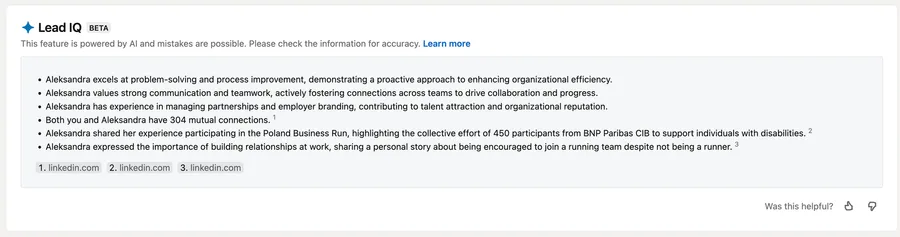
So what’s new? The place. Since September 2026 the same summary appears in the Sales Navigator view embedded in your CRM, known as CRM Embedded Experiences. A salesperson opens a contact or opportunity record in the CRM and sees Lead IQ next to the CRM data, without switching to Navigator. LinkedIn says this shows who really matters on an open opportunity, which is marketing gibberish. In my view it simply cuts the time I need to assess a lead and prepare for the call.
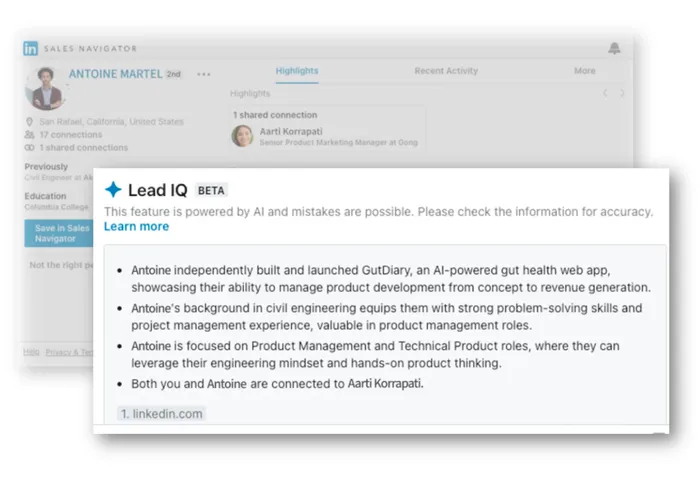
What the AI summarizes in Lead IQ
The documentation lists four kinds of information:
- the lead’s interests;
- their recent activity on LinkedIn;
- shared connections or shared experiences, for example the same university or a former employer;
- the priorities and challenges of the company the lead works for, in other words a slice of what Account IQ shows.
Where does it all come from? Data about the person comes from the lead’s public profile and LinkedIn activity, and data about the company from Account IQ, the company summary Sales Navigator generates separately. If the lead has an empty profile and posts nothing, there may be no summary at all. LinkedIn admits this in its documentation: Lead IQ isn’t available for every lead.

What does LinkedIn suggest using it for? Reviewing the lead’s background before a call, finding shared connections, understanding their company’s situation and preparing topics for the first message. As I wrote above, the feature works and it’s useful, but only when the AI has something to build the summary from. Otherwise you get nothing, or generic filler like “Aleksandra values strong communication and teamwork, actively fostering connections across teams to drive collaboration and progress”, which is the Tinder equivalent of “I like music and hiking in the mountains”.
Why you won’t see Lead IQ if LinkedIn isn’t in English
Because it only works in English. The line from the documentation: Lead IQ is currently only available if your LinkedIn.com language is set to English. This is about the language setting of your LinkedIn account, not the language your CRM runs in.
What does that mean for a team in a non-English market? A salesperson whose LinkedIn is set to Polish, German or any other language won’t see Lead IQ in the CRM, even if the company pays for Advanced Plus and has CRM Sync connected. To make the feature appear, you have to switch the account language to English.
What doesn’t matter, on the other hand, is the language of the lead’s profile or the language they use LinkedIn in. Language settings and options in general are among the basic mistakes I find at clients and fix during Sales Navigator training.
Who can use it
Three conditions at once:
- a Sales Navigator Advanced Plus license, which means you work at a corporation or a genuinely wealthy company;
- a CRM connected to Sales Navigator through CRM Sync, with Salesforce, HubSpot, Microsoft Dynamics and Oracle supported (Oracle is new, it wasn’t on this list before);
- LinkedIn.com set to English.
What about the admin? Lead IQ is on by default, but a Sales Navigator admin can turn it off in the settings for AI-assisted features. So if a salesperson meets all three conditions and still sees nothing, the first question goes to the admin. How much does Advanced Plus cost? LinkedIn doesn’t publish a price, the license is quoted individually, as I describe in my Sales Navigator pricing guide.
What to watch out for with AI summaries
Can you paste a Lead IQ summary straight into a message? Not without reading it first. LinkedIn itself says AI-generated content can contain mistakes and has to be checked before use, and in the graphic from the announcement the Lead IQ panel carries a BETA label and the warning “This feature is powered by AI and mistakes are possible”.
The summary is built from the public profile, so it’s only as current as the lead’s profile, and I’d treat it as a hint and a direction, not as the truth. The summaries have improved, but a year ago, when the feature was rolling out, I could get a recommendation to talk about a mindfulness course, because the lead happened to have posted about it.
Can you already picture the screenshot of that salesperson’s message doing the rounds online?
I saw you’re into mindfulness, so maybe you’d be interested in my LinkedIn lead generation software. 3 meetings a week guaranteed, and you can devote yourself to mindfully observing reality.
A full overview of the September release, including a table of availability by license, is in my post on Sales Navigator’s new features in 2026. In my Sales Navigator training I show how to prepare a first message to a lead so that the AI is a starting point, not a ready-made script.
Sources
Frequently asked questions about Lead IQ in your CRM
Maybe we can do something together?
If you like what I write, maybe I can write something for you?