Sales Navigator Alerts in LinkedIn Notifications: What You See Without Opening Navigator
Since September 2026 the most important Sales Navigator alerts arrive as regular LinkedIn notifications: a saved lead getting promoted or changing jobs, a senior hire at a saved account, new results for a saved search. On every license, Core included.

Rafal Szymanski
I implement LinkedIn and Sales Navigator in companies so they turn a profit.
I've been training people in LinkedIn since 2016 — more than 5,000 of them, across 200+ B2B companies. Founder of B2B Marketing.AI, a CRM platform for advanced LinkedIn users. I help sales and marketing teams turn LinkedIn into a predictable source of leads. I've spoken about LinkedIn at the biggest conferences, including I Love Marketing, InfoShare and Effie, and picked up a few awards along the way.
Published On

In this article you’ll find everything we know about Sales Navigator alerts in LinkedIn notifications, which LinkedIn announced on September 22, 2026: which alerts end up there, which licenses get them, how this differs from the Microsoft Teams integration, and what to do so the notifications actually arrive.
My experience tells me two things, and they are why I think this small feature is very helpful. First, 90% of the people I know because I trained them on Sales Navigator never install the mobile app. Even if they install it, they don’t open it, and here I have to admit I’m writing about myself too. I have the app, but I use Sales Navigator on my laptop and only occasionally on my phone. Second, if someone isn’t a Sales Navigator heavy user like me and doesn’t spend hours in it every day, they tend to look in when they have something to do, which means: rarely. Far more people use “regular” LinkedIn and log in to it, and more and more of them do it on their phones. That’s why I think showing SN notifications in regular LinkedIn is a good move by the platform.
In this article you'll learn:
- which Sales Navigator alerts arrive as LinkedIn notifications;
- why this works even on the cheapest license, Core;
- how it differs from the Microsoft Teams alerts;
- what you need to have saved for the alerts to arrive.
What changed in Sales Navigator alerts
Some Sales Navigator alerts now arrive as regular LinkedIn notifications, next to reactions to your posts and job offers. You don’t have to open Navigator to see that a saved lead got promoted.
Why did LinkedIn do this? The announcement says it meets sellers where they already are 5 or more days a week. Sales Navigator is a separate app that many users open less often than their feed, and an alert nobody opens is worth nothing. As I wrote above, I agree 100%. I also know people who switched on a license once and simply have it, without ever looking at the tool.
Which alerts show up in LinkedIn notifications
The documentation lists three kinds:
- a saved lead got promoted or moved to another company;
- a saved account or an account from your CRM made a senior hire;
- a saved search has new results.
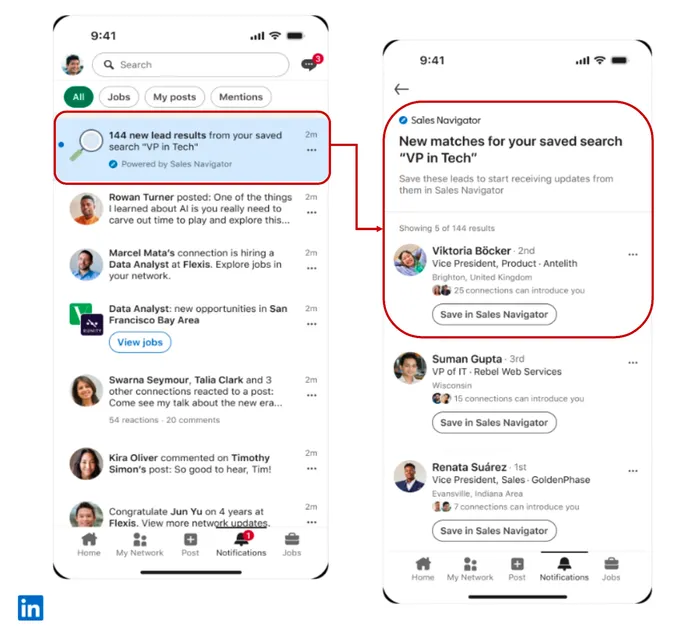
What does it look like? In LinkedIn’s graphic the notification reads “144 new lead results from your saved search VP in Tech” and is marked “Powered by Sales Navigator”. Tap it and you see a list of new people, each with a “Save in Sales Navigator” button, so you save the lead straight from the LinkedIn app. Each person also shows how many connections can introduce you.
And the rest of the alerts? Lead posts, account headcount growth, or mergers and acquisitions are still on the Sales Navigator homepage and in the embedded CRM view. Only these three kinds go to LinkedIn notifications.
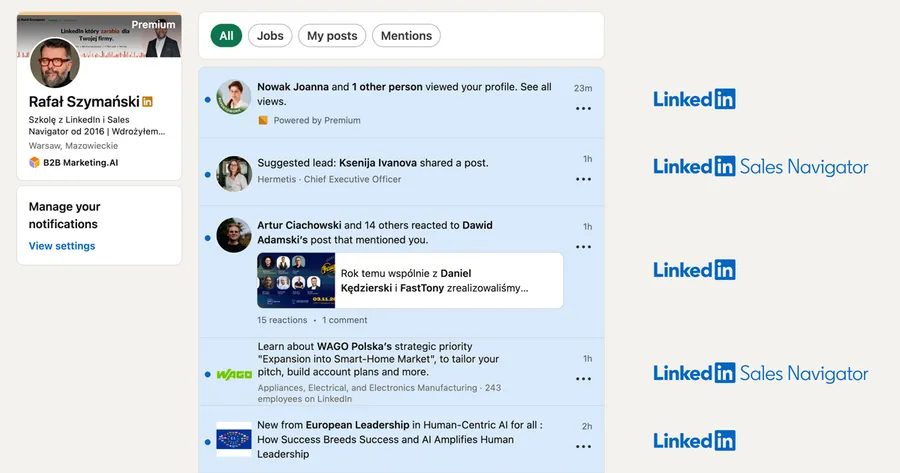
This is how it looks on my account, and notice that the Sales Navigator notifications look no different from the regular ones, so they are easy to miss. Something else surprised me, though only a little, knowing how slow and chaotic LinkedIn rollouts can be: I see these notifications on desktop but not on mobile. They will probably come with the next app update.
Does this work on Sales Navigator Core?
Yes, and that is the most interesting part of this change. In the availability table of the release notes the feature is ticked for Core, Advanced and Advanced Plus. Most of the other new features in the same release, the ones about Teams and the CRM, are Advanced Plus only.
How much does Core cost? In September 2026 LinkedIn’s public price list showed Core from $119.99 a month, and my own account in Poland showed PLN 440.00 a month net. The details are in my Sales Navigator pricing guide.
LinkedIn notifications or Microsoft Teams?
How is this different from Teams? The Microsoft Teams integration from the same release works only on Advanced Plus, needs the app to be installed by an IT admin, and sends no alerts about people in the European Economic Area, Switzerland and the UK. LinkedIn notifications have none of these conditions in the documentation: they come with every license and there is nothing to install.
For a team that sells inside the EU, LinkedIn notifications are the version of this release that can work right away. I write more about Teams in my post on Sales Navigator for Microsoft Teams.
What to do so the alerts actually arrive
Why might someone get none of these notifications? Because alerts only cover what you have saved. Without saved leads, saved accounts and saved searches, Sales Navigator has nothing to tell you about.
- Save the leads whose changes you want to know about.
- Save the accounts where you are looking for new decision makers.
- Save a search that describes your ideal customer, so you get notified about new results.
For job change alerts, the Sales Navigator documentation also requires you to switch on the relevant toggles in the notification settings inside Navigator itself.
The full overview of the September release, with the table of which license gets what, is in my post on new Sales Navigator features in 2026. In my Sales Navigator training we build saved searches and lists so that your alerts are about your customers, not random people.
Sources
Frequently asked questions about Sales Navigator alerts in LinkedIn notifications
Maybe we can do something together?
If you like what I write, maybe I can write something for you?