Sales Navigator Alerts in Microsoft Teams: Be the First to Know
Since September 2026, Sales Navigator alerts about decision-maker changes land in Microsoft Teams. Two catches: you need an Advanced Plus license, and (this is the one that hurts most in Poland) there are no alerts about people in the European Economic Area. For customers in the US, though, it works great.

Rafal Szymanski
I implement LinkedIn and Sales Navigator in companies so they turn a profit.
I've been training people in LinkedIn since 2016 — more than 5,000 of them, across 200+ B2B companies. Founder of B2B Marketing.AI, a CRM platform for advanced LinkedIn users. I help sales and marketing teams turn LinkedIn into a predictable source of leads. I've spoken about LinkedIn at the biggest conferences, including I Love Marketing, InfoShare and Effie, and picked up a few awards along the way.
Published On
In this article you’ll find everything we know about the Sales Navigator for Microsoft Teams integration, which LinkedIn announced on September 22, 2026: which Sales Navigator alerts reach Teams, who has to enable it, why it works only on the Advanced Plus license, and why a sales team in Poland gets less out of it than the announcement promises.
My professional experience tells me that this seemingly small change can be a game changer for sellers.
Why? In social selling campaigns most deals are lost because the seller reacts too slowly: they answer a message a week later, “because I was busy”, or miss important news about changes at their customers.
And however much we complain about Teams, that is where we spend most of the day. So having the most important updates about your leads land straight in your Teams, without switching over to LinkedIn, is in my view a great feature that will help you react faster.
In this article you'll learn:
- which Sales Navigator alerts show up in Microsoft Teams;
- why the integration works only on the Advanced Plus license;
- why you get no alerts about people in Poland and the rest of the EEA;
- who in the company has to enable the integration, and in what order;
- which teams it makes sense for, and which it doesn’t.
What is Sales Navigator for Microsoft Teams
It is a new feature that sends selected Sales Navigator alerts to Microsoft Teams. LinkedIn describes it as bringing buying signals (Buyer Intent) to where the seller spends the day anyway, and makes it the headline of the September release under the slogan “It works where you work”.
Does it change anything? LinkedIn says that in beta, Teams alerts were three times more likely to lead to action than regular alerts. That number comes from the announcement with no methodology, so I treat it as a claim, not a fact. In my opinion, whether a seller takes action doesn’t depend on getting the 1,001st notification of the day, but on how the sales process is set up. And let’s be serious: sellers who got the beta and were watched while they worked are not normal users. I know, because I was one of those beta testers for the first version of Sales Navigator in early 2016.
Which alerts reach Teams
The documentation lists four alert types:
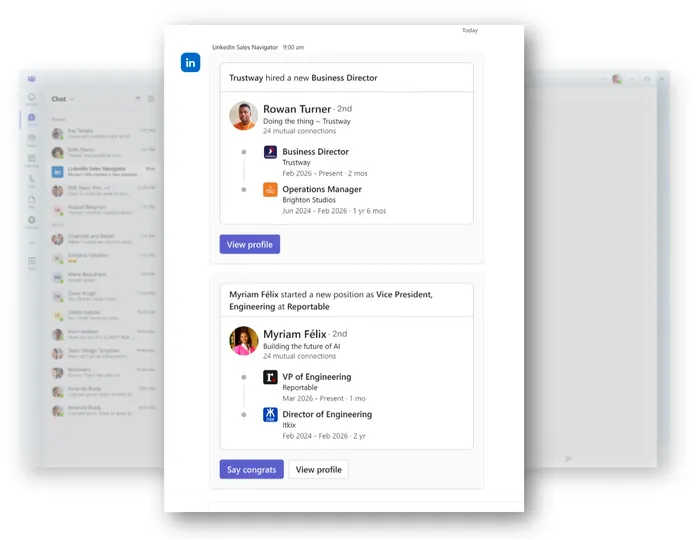
- a new decision maker joined a saved account: great, as long as you have set up the right ICP first;
- a decision maker at a saved account was promoted: a super option, because before there was no convenient way to track it;
- a decision maker left a saved account: crucial for keeping that customer or winning a new one;
- a saved search has new results: this used to be available as an email notification.
Every alert has links back to Sales Navigator: to the profile, to save the lead, to send a message or connection request, and to the search results. LinkedIn’s graphic also shows a “Say congrats” button next to a job change. Recommended leads sent to Teams are additionally filtered to match your buyer persona (ICP), the description of your ideal customer set up in Sales Navigator.
And what’s missing from the list? Lead posts, Buyer Intent signals and company headcount growth. You still see those alerts in Sales Navigator and in the view embedded in your CRM. It’s worth keeping an eye on, though, because more alert types may be added over time.
Why you get no alerts about people in Poland
Because LinkedIn doesn’t send them for now. The line from the documentation: “No alerts about people located in the European Economic Area (EEA), Switzerland, and the UK are currently provided”. Poland is in the European Economic Area, so an alert about the promotion of a CEO in Poznań will not reach Teams. You’ll still see it in Sales Navigator as before, and if you have set up email notifications, you’ll get those too. Don’t know how to do that? Take a look at my training or book a consultation.
Why is that? LinkedIn gives no reason, but my assumption, as usual, is that Microsoft wants to be “holier than the Pope”, as the saying goes, and until its lawyers have earned enough adapting the new policies to GDPR, we won’t get this option.
Who will find this feature useful? Teams based in Poland that sell outside Europe, for example a software house looking for clients in the US. If you sell in Poland and Germany, today you’ll get an empty inbox in Teams. For now.
Who has to enable it, and in what order
Two people, in this order:
- An IT admin installs the Sales Navigator app in Microsoft Teams for the whole organization. Without it, the seller has nothing to connect to.
- Each seller connects their Sales Navigator account to Teams and starts receiving alerts from that point.
The first step is often the bottleneck, because the Teams app is installed by the IT admin of the whole organization (not the Sales Navigator license admin, that’s a separate role), not by the seller. Before you ask IT to install it, check that your license is Advanced Plus. With Core or Advanced the app won’t do anything. This is where I see the biggest blocker, because in my experience, if IT doesn’t have to do something, it doesn’t. The trainings I’ve run for large organizations also show that at country or even regional level, users don’t know who the right person to send such a request to is.
Who Sales Navigator for Teams makes sense for
In my opinion, for a team that meets three conditions at once: it has Advanced Plus (meaning it’s a corporation or a wealthy company), it works in Teams all day, and it sells to companies outside Europe.
If you have Core or Advanced, you’ll get a similar effect from another feature in the same release, available on all licenses: some Sales Navigator alerts now arrive as regular LinkedIn notifications. I covered it in my post about Sales Navigator alerts in LinkedIn notifications.
A full overview of the September release, including a table of availability by license, is in my post about new Sales Navigator features in 2026. In my Sales Navigator training we set up alerts so they don’t flood the team, whether they arrive in Teams, email or notifications.
Sources
Frequently asked questions about Sales Navigator in Microsoft Teams
Maybe we can do something together?
If you like what I write, maybe I can write something for you?