Warm Introductions in Sales Navigator: Who Can Introduce You to the Decision Maker
Since September 2026 Sales Navigator shows warm introduction paths right in search results: who can introduce you to a lead, why that person in particular, and which of the company's leaders are closest to you.

Rafal Szymanski
I implement LinkedIn and Sales Navigator in companies so they turn a profit.
I've been training people in LinkedIn since 2016 — more than 5,000 of them, across 200+ B2B companies. Founder of B2B Marketing.AI, a CRM platform for advanced LinkedIn users. I help sales and marketing teams turn LinkedIn into a predictable source of leads. I've spoken about LinkedIn at the biggest conferences, including I Love Marketing, InfoShare and Effie, and picked up a few awards along the way.
Published On

In this article you’ll find a description of warm introductions in Sales Navigator after the September 22, 2026 update: new badges in search results, a list of people who can introduce you to a lead along with the reason why, paths to the leadership of an entire company, and what you see on a Core license versus what only comes with Advanced.
The “Get introduced” option, which shows who can introduce you to a specific person and why, lives in the details of the lead card in Sales Navigator. For me it works terribly, because it always shows that the same single person will introduce me to anyone in Poland: the famous Grzegorz in the red jacket, a professional networker. And while Grzegorz probably does know a lot of people, and a lot of people know Grzegorz, I doubt he is really LinkedIn’s best pick for every introduction. So I was curious to read that Get introduced is now supposed to show the best people for a warm intro based on the actual strength of the relationship, not just the number of mutual connections and shared employers.
In this article you'll learn:
- what a warm intro is and where Sales Navigator shows it now;
- how to read the new badges in search results;
- how Sales Navigator sorts the people who can introduce you;
- how to find paths to a company’s leadership, not just to one person;
- what you see on Core and what requires TeamLink on Advanced.
What is a warm intro in Sales Navigator
It is a path to a lead through someone you both know. Instead of sending yet another cold LinkedIn message that goes unanswered, you ask a mutual acquaintance to introduce you. An old method in a new place. Sales Navigator used to show these paths already, but on the lead page, so you had to open every profile separately.
What changed in September 2026? The place. The paths are visible right in search results, sorted and with an explanation of why a given person is a good route to the lead. LinkedIn describes this as four new features, which I go through below.
Badges in search results
Leads in search results now have new badges showing that a warm path to them exists. In LinkedIn’s graphic these are, for example, “3 Executive TeamLink connections” and “8 Mutual connections” under the lead’s name. That said, either I have too many new Sales Navigator accounts or this was already there on Advanced Plus, because I checked the slides from my training and I had these badges before.
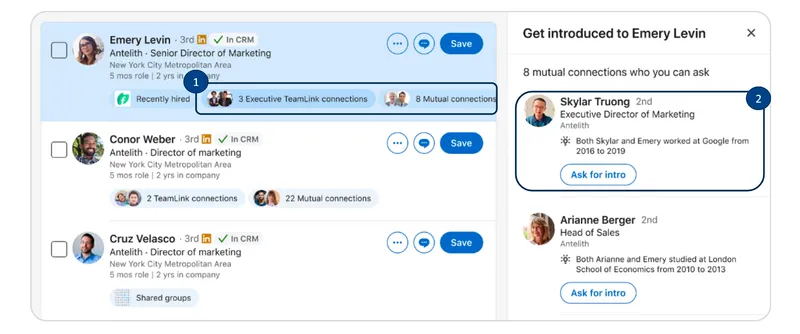
Clicking a badge opens a panel with a list of people who can introduce you. The list is sorted by relationship strength, and each person comes with a reason. In LinkedIn’s example: she and the lead worked at the same company from 2016 to 2019. Under each person there is an “Ask for intro” button. One click. Nice, because before you had to dig into the details on the contact card.
Does the reason help? Yes, because a mutual connection the lead worked with for three years is a different request from a connection who just clicked accept on an invitation at a conference. It certainly won’t replace the preparation you can do with Lead IQ (I describe it in the post on Lead IQ in the CRM, also a new feature), but it will definitely speed up the work.
Paths to a whole company’s leadership
The second pair of new features is about the company, not a single person. When you search for leads at one company, a badge appears: “Intro paths to senior leaders”. Click it and you see a list of that company’s leaders, sorted by the strength of the introduction paths. In LinkedIn’s graphic that is 12 leaders, each with a number of paths, for example “5 intro paths”. Now that is something I was missing.
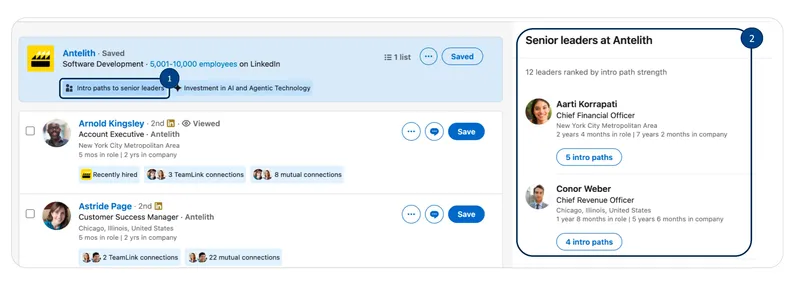
What is it good for? Sales where several people decide. In other words, most B2B sales. Instead of looking for a way to one director, you see which board member you are closest to, and you can start there. Working out the whole buying committee, who works with whom and where everyone sits in the hierarchy, used to be a real pain. If this works the way they describe it, great.
What you see on Core and what on Advanced
The release notes list warm intros on all three licenses. But some of the paths in LinkedIn’s graphics go through TeamLink, meaning your colleagues’ connections, and TeamLink is on Advanced and Advanced Plus, not on Core. I broke this down in the Sales Navigator pricing post.
So what will a Core user see? Most likely paths through mutual connections in their own network, without TeamLink badges. Still useful, if it starts showing a list of colleagues or more variables than before.
The full overview of the September update, with a table of availability by license, is in the post on Sales Navigator 2026 features. In my Sales Navigator training we look for warm paths to your most important customers on your own account.
The whole series on the September Sales Navigator release
Sources
Frequently asked questions about warm introductions in Sales Navigator
Maybe we can do something together?
If you like what I write, maybe I can write something for you?