How to Use AI on LinkedIn Without Sounding Like a Bot: Takeaways from the Social Media Examiner Podcast
Learn how to use AI on LinkedIn without getting labeled as AI slop. The best ways to write posts with AI, LinkedIn comments, the most effective days to post, vertical or horizontal video, and LinkedIn ads.

Rafal Szymanski
I implement LinkedIn and Sales Navigator in companies so they turn a profit.
I've been training people in LinkedIn since 2016 — more than 5,000 of them, across 200+ B2B companies. Founder of B2B Marketing.AI, a CRM platform for advanced LinkedIn users. I help sales and marketing teams turn LinkedIn into a predictable source of leads. I've spoken about LinkedIn at the biggest conferences, including I Love Marketing, InfoShare and Effie, and picked up a few awards along the way.
Published On

In this article you’ll find my takeaways from episode 738 of the Social Media Marketing Podcast on how to use AI on LinkedIn and still sound human: what LinkedIn is doing about AI slop, where AI helps when you write posts, whether comments can replace posting, which days to post, which video format to choose, and how many versions of an ad to run in one campaign.
I really like these hosts, but (I don’t know about you) I’d rather read condensed advice than listen to 45 minutes of talk and mutual back-patting.
Let’s start by trying to work out what LinkedIn actually wants from us. On one hand it blocks automation and lets you report posts as “AI slop”. On the other it keeps adding new AI features. I agree with Jerry Potter’s take: “Use AI, but don’t let us notice you used AI.” In other words, use AI, but in a way your audience won’t notice.
In this article you'll learn:
- what LinkedIn has changed in its fight against AI slop and whether it shows;
- which part of writing a post AI is good for, and which it isn’t;
- how readers recognize automated text;
- when commenting on other people’s posts is enough instead of posting your own;
- which days AJ Wilcox posts and why not twice a day;
- what his tests showed about video format and the number of ad creatives.
TL;DR: AI on LinkedIn in five points
- LinkedIn says it’s fighting AI slop, but under the posts there’s no difference yet: the same five commenters, all of them automated.
- AI helps before you write and after you write. The middle, meaning what you know from your own work, you write yourself.
- Got 20 minutes a day and no new concepts of your own? Commenting on other people’s posts is a legitimate strategy.
- Posting on Tuesdays and Thursdays works best, and if it’s only one day a week, try Wednesday. A second post on the same day takes the engagement away from the first.
- In LinkedIn ads, two creatives per ad set work best, four at most. I don’t recommend bringing your Meta habits over.
Who was talking in episode 738
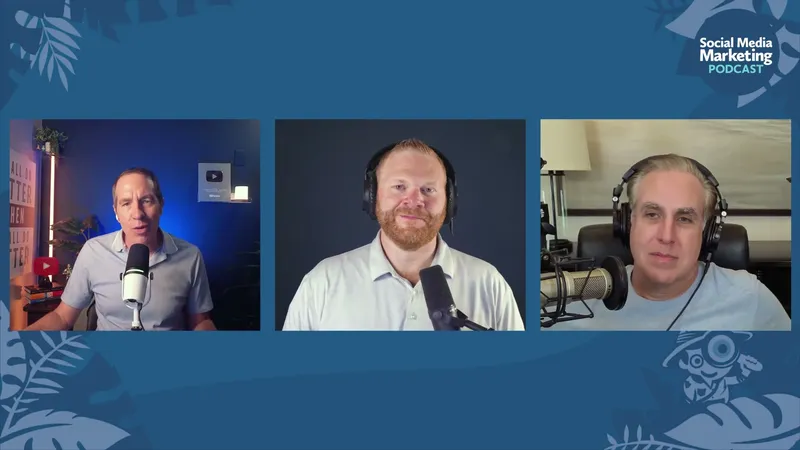
The Social Media Marketing Podcast is a weekly show from Social Media Examiner, hosted by Michael Stelzner. In this episode most of the questions came from co-host Jerry Potter. The guest was AJ Wilcox, founder and CEO of B2Linked, a LinkedIn ads agency, and host of The LinkedIn Ads Show podcast.
Why listen to an ads guy when the conversation is mostly about posts and comments? Because in ads you can run the same content in three versions and measure which one won, and with organic content you can’t run that test. Wilcox stresses this himself and flags when he’s talking about a test and when it’s an impression from his own account.
Is there less AI slop on LinkedIn?
Let’s start with what LinkedIn has announced in recent months:
- LinkedIn blocks hundreds of thousands of automated comment attempts every day and billions of automated posting attempts;
- anyone can report a post or a comment as Seems like AI slop;
- authors are supposed to see in their analytics that readers felt a post leaned heavily on AI;
- the Enhance Your Post feature, which rewrote the post for the author, is being replaced by a proofreading tool.
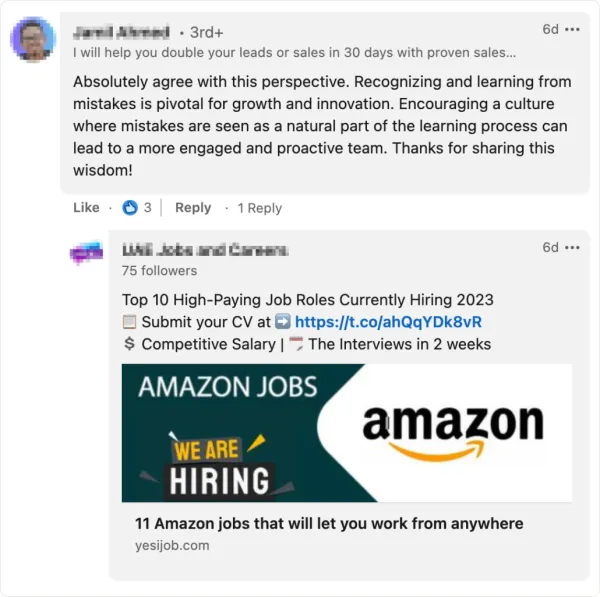
Does it show? Wilcox kept it short: “I see no difference.” Under every one of his posts the same five commenters turn up, and every one of them is automated. Stelzner has one such regular, always first in the comments. He reports him and nothing happens. I can see who comments with AI too, and I had no trouble quickly finding a good example.
Why does flagging a post or a comment as AI change nothing? In Wilcox’s view a report isn’t a penalty today. It’s information for LinkedIn, which learns from it what people consider worthless. He expects reports to start affecting reach over time. Potter added who these comments already hurt: the author of the post. When he sees nothing but automated comments under someone’s post, he thinks: “Why should I join that conversation?”
There was also a warning for anyone who sees reports show up in their own analytics. Some of them will be malicious, because a competitor or a former employee will report you. One report means nothing, but if there are a lot of them, it’s time to take a look at your own style. From where I sit there’s another risk tied to this. Right now the problem is engagement pods, known in Poland as “secret business support groups on LinkedIn”, which so far have only liked and commented on each other’s posts. I’m afraid they’ll now start mass-reporting competitors’ posts as AI slop.
Where did this whole mess come from? Wilcox thinks LinkedIn brought it on itself: as a Microsoft company, with Microsoft invested in OpenAI, it pushed AI into every feature, even though it was easy to predict it would end with bots talking to bots. Now the pendulum is swinging the other way. I wrote about the same impression (“bots write the posts and other bots comment on them”) in How to Use LinkedIn in 2026, and about how to recognize an account with no human behind it in my guide to fake profiles and spam bots.
What to use AI for when writing LinkedIn posts
Wilcox splits writing a post into three parts, and AI helps him with two of them:
- Before writing: he tells AI what he wants to say and asks it to flesh out the idea and list the points he should hit.
- In the middle: he writes it himself, because this is where his expertise is. In his view that’s exactly what the texts people call slop are missing.
- After writing: he asks it to improve readability so the text is easy to scan.
Sound familiar? I’ve written about the “Wikipedization” of content: AI will generate a post with a definition of marketing in three seconds, but it can’t fake your failures or what you learned from them. See my talks from I Love Social Media, where I go through exactly this.
And dictation? Stelzner admitted that he dictates comments more and more often, because he speaks faster than he types, and that he sees more and more long, nicely formatted paragraphs in comments that look dictated. Wilcox has no problem with that and doesn’t call it slop. He only pointed out that we write differently than we speak, so a dictated comment will sound different from your post. One of my own LinkedIn posts, the one about the 1,000-character limit on comments, was dictated too, which I admitted in its PS. It traveled well, and I’m planning to refine this way of preparing posts.
How does a reader recognize AI slop in a post? Four tells came up in the conversation:
- the em dash;
- the “It’s this, not that” construction;
- dramatic openers like “This is silently killing you”;
- emojis in comments.
Wilcox has given up em dashes completely and would rather put in a plain hyphen, even if it’s wrong. Potter went the other way and has “Proud longtime em dash user” in his email signature. It happens.
I use a mix of both approaches when I prepare my posts, this one included:
- as someone worn out by a proper education, I used to use dashes correctly, and now I have a Claude skill that tries to remove them and rephrase the sentences;
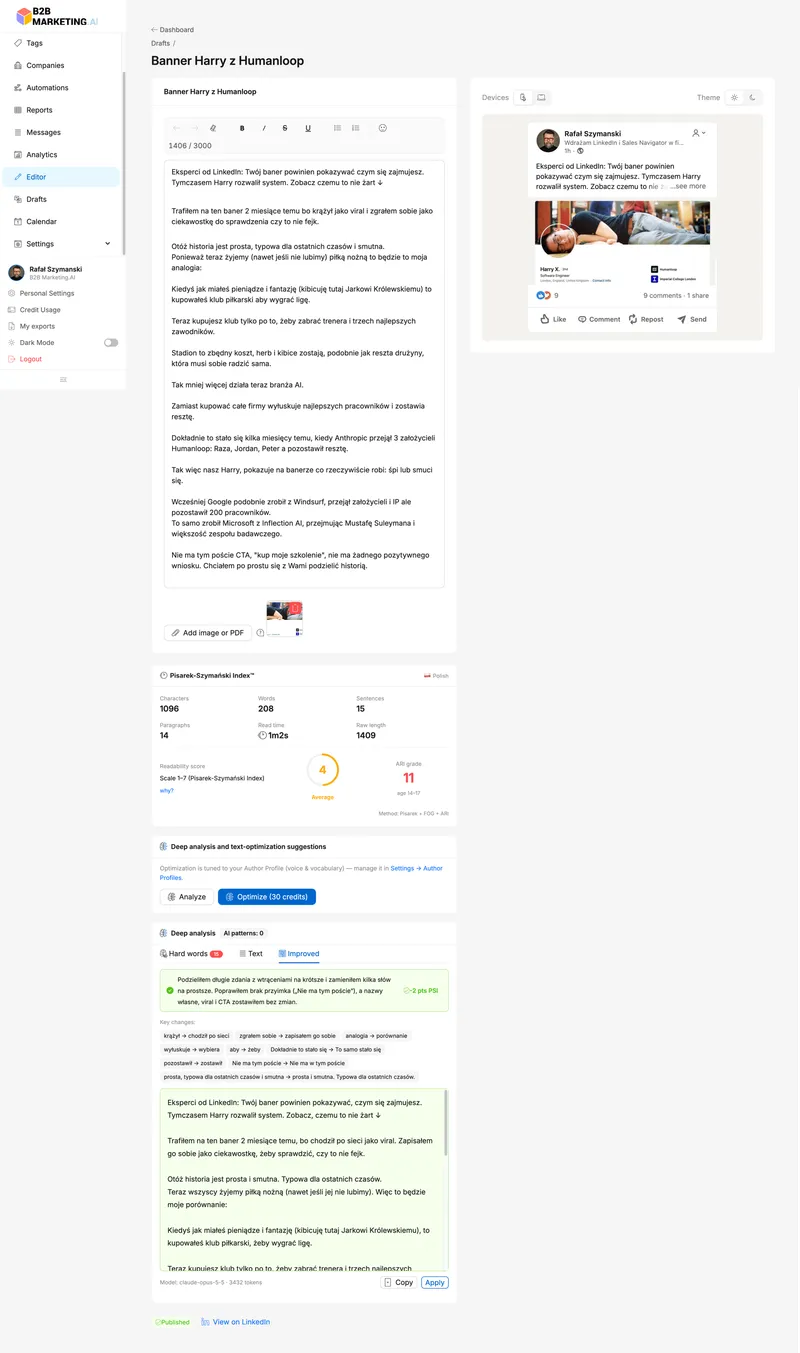
- the same skill and the post-writing tool in my CRM for LinkedIn keep a database of my favorite phrasings (even the incorrect ones), a list of industry terms they’re not allowed to correct, and so on;
- I have a small AI model based on the Polish model Bielik that suggests how to rewrite a text so it’s easier for a Polish reader to understand without turning it into AI slop. The so-called frontier models from OpenAI, Anthropic, and Google are really weak at writing in Polish.
Comments instead of posts: are 20 minutes a day enough?
Potter asked a question close to what I hear most often in my trainings (“I want to start, but posting is beyond me”): someone has 20 minutes a day for LinkedIn, so can they just comment instead of posting? Wilcox: “I think so.” With one exception: if you really do come up with new things and want to be associated with them, you have to start posting.
Behind the question were three changes Potter cited from LinkedIn: comments are to be visible without clicking, time spent in comments is up 18% year over year, and instead of one “top” comment everyone is supposed to see a different one at the top, picked for them.
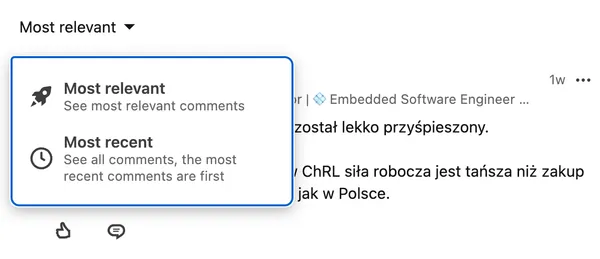
None of this is news to me. I’ve been saying for a long time that comments get more reach than posts and that I prefer three to five in-depth comments a day over one-line “great post!” replies. I wrote about view counts under comments back when LinkedIn was only testing them: LinkedIn Comments as a Good Start for Action.
What does Wilcox add to that?
- your feed shapes itself from who you interact with and who you exchange messages with, so start with people, not with settings;
- look where your customers are, not your peers. When he searches the LinkedIn ads hashtag he finds nothing but competitors, so he looks for clients under a broader topic, B2B marketing;
- comment in the first hour or two after a post goes up, because most of his posts published in the morning are dead by the evening;
- don’t glue yourself to every post from the biggest influencer in your industry;
- end your comment with a question. His favorite is “Am I wrong, or what am I missing?”
Where does that last one come from? Years ago the head of LinkedIn company pages told Wilcox that the metric they cared about most was something he called comment density: the depth of the conversation rather than the number of comments. Ten rounds of “Thanks, bro” don’t make a post a valuable discussion, while an exchange where someone asks a follow-up and someone answers does. Wilcox assumes personal profiles are judged in a similar way, but that part is his guess.
Stelzner added two things from an author’s point of view. He doesn’t reply to comments where someone tacked on “and what do you think?” just to force an answer. And the posts that collect the most comments are the ones people disagree with, which he doesn’t like and doesn’t provoke. Wilcox then asked him how to tell someone they’re wrong without being a jerk. Stelzner’s recipe: thank them for their view, find something you can honestly compliment, and only then write “I have a slightly different take.” Potter added a principle from the series Ted Lasso: “Be curious, not judgmental.” Instead of writing “I disagree”, he keeps asking questions until the other person has to justify their own claim. Apparently it works on kids too.
My own story about how a comment under Paweł Tkaczyk’s post ended up in his trainings is in the article on the algorithm and reach.
How often to post on LinkedIn
Wilcox posts on Tuesdays and Thursdays. Why not Monday? Because that’s when everyone posts and a post gets lost in the crowd. On Friday people’s minds are already elsewhere. When he has only one post in a week, he puts it out on Wednesday.
I know Monday from the Polish market. I call it the New Year’s resolution effect: on Sunday evening we decide “I’m going to build my brand”, and on Monday everyone floods the feed. I talked about it on the Escola Mobile podcast.
And two posts on the same day? Here Wilcox has an observation from his own account. The first post collects engagement until the second one appears, and then the second takes all of it. Asked about influencers who post several times a day, he said that if it works for someone, they shouldn’t fix it. He looks at his own data.
What about posts that come back after a week? Wilcox says LinkedIn announced longer-lived posts about six months ago and that you can see it a little, but most of the action still happens around the latest post. When one of his posts takes off, comments keep coming for another two or three days. I’ve already written about older posts in the feed in LinkedIn Promotes Old Posts.
My approach is similar, but unlike the podcast hosts I also have data from tens of thousands of LinkedIn posts. At first I collected data on the results of every post: I counted likes and comments, the length of the post and the length of the comments, and then matched all of it against the day and hour of publication to find the key to what works best. It’s a sound method, and I apply the conclusions from that research for myself and for clients, but I’d encourage you to take a different approach: post when your fans are on LinkedIn, meaning the people who can see your post and react to it.
In our CRM for LinkedIn we’ve added a new feature to the post analytics tab. It builds a knowledge base about the people we can call our fans: who supports us and how strongly, on which days and at what times they’re on LinkedIn, and when they post themselves (because maybe it’s worth returning the favor and supporting them?).
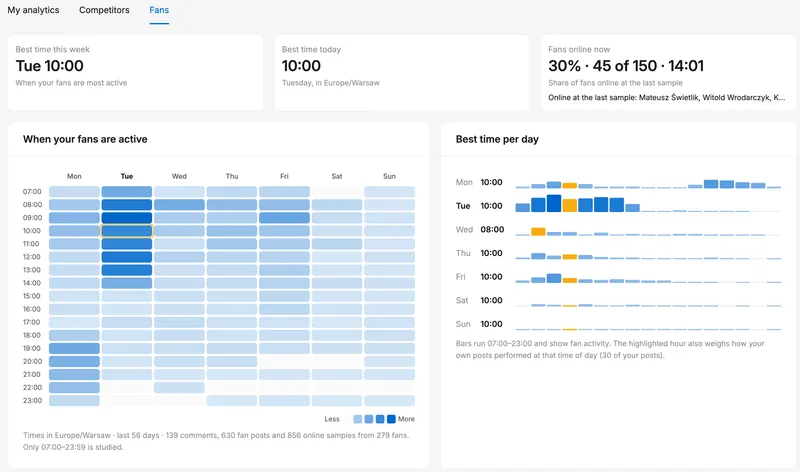
Which approach do you think works better: hunting for a posting day and hour at random, or studying your audience’s habits first?
Live streams, AI clips, and video format
Another new feature Potter cited: AI is supposed to analyze live streams, pick the standout moments as short clips (you can adjust the length), and split the recording into chapters. According to the announcement, everyone worldwide gets it. Potter does a weekly live stream from his personal profile and couldn’t find it there, so he suspects that for now it only works on company pages.
I don’t see it on anyone’s account yet either, so I’ll hold my opinion until I can test it.
Is it a reason to start live streaming? Wilcox says no. The feature fixes replays, which until now you couldn’t even scrub through properly, but it won’t bring more people to the live stream. In his view it should have shipped two or three years ago.
A longer part of the conversation was about video format. Wilcox’s agency ran the same content in ads in three versions: wide, square, and tall. Since 80% of engagement on LinkedIn comes from mobile, vertical should win, right? Wide 16:9 won, and across the board: on engagement, watch time, and completion rate. Stelzner offered an explanation: with horizontal video, the post text still fits on the screen. Wilcox added a second one: when vertical video fills the whole screen, you can’t see the like and comment buttons, so people tap them less often.
This is where Wilcox and I part ways, because in my article on how to use LinkedIn in 2026 I wrote that vertical video works and horizontal doesn’t. He himself notes that he measured ads and doesn’t know whether organic content behaves the same way. About images he said something different again: in his ads square wins, and he has heard good things about the 4:5 format but hasn’t tested it.
I have data from organic post analytics, and it’s unambiguous: posts with vertical video get the best results, not horizontal. Of course this isn’t a strict A/B comparison, but I’m talking about videos published from the same user account in different formats, with similar content, on the same days and at the same hours.
To close this thread, a tip for anyone who can’t drag their CEO in front of a camera. Don’t tell them to record “a little video”. Sit them down, ask a series of questions, and then cut out the best answers. Wilcox records such conversations in Descript, SquadCast, or Riverside, because Zoom and Google Meet degrade the video and audio quality. Stelzner uses StreamYard and says AI keeps getting better at finding the best fragments on its own. For ads aimed at people who don’t know the company, Wilcox aims for 30 to 40 seconds.
I’m taking this advice for myself, which is why articles just like this one, picked from my own podcasts and from other people’s, will keep appearing on the blog.
LinkedIn ads: how many creatives per ad set
Potter cited a number from LinkedIn’s announcement: advertisers who test more than five ad variations see a 20% higher CTR than those who run one. On top of that, LinkedIn added AI tools that write those variations, plus brand kits.
If you’re curious, see the LinkedIn Help page: Create ads using the brand kit in Campaign Manager.
Are the tools any good? Wilcox has tested them quite a bit and says the result is the same as pasting your logo and brand description into ChatGPT. There’s one plus: you don’t have to copy anything between windows. For now they only write headlines and intros, and he edits everything by hand anyway.
It got more interesting when the question turned to whether you should then produce more variations on your own. Wilcox: “I don’t recommend it.” Why, when LinkedIn says otherwise? Because according to him, five or more creatives in one ad set lifts the frequency cap, and an ad can reach the same person more than twice a day. You then enter more auctions and raise prices for yourself and everyone around you. And LinkedIn will still pick its one or two best versions and give them most of the impressions. That is his claim, not a LinkedIn statement.
What does he recommend instead?
- two creatives per ad set, four at most;
- a creative is one version of an ad, so one image with two different intro texts already counts as two creatives;
- bring your best-performing ad over from Meta and test it on LinkedIn, but don’t feed LinkedIn content the way you feed Meta. In his words: “Meta loves lots of content. LinkedIn does not.”
It’s hard for me to argue with someone who does nothing but LinkedIn Ads, but my experience is very similar. That’s one of the reasons we build our own LinkedIn Ads know-how at the agency: most of the market experts I’ve worked with, or that we tried to hand campaigns to, blindly copied tactics from Meta that don’t work, and then complained about LinkedIn.
What I’m taking away from this episode
First, comments. I talk about them in my trainings, and Wilcox adds two things you can try right away: the window of the first hour or two after a post goes up, and a question at the end of the comment aimed at other readers, not at the author.
The “golden hour after publishing” is a myth when it comes to building reach, but I agree that the “spray and pray” tactic (publish, ignore the commenters, and pray for reach) isn’t a good idea either. Simply put, look after your relationships with your audience the same way you look after your posts, by replying to their comments.
Second, LinkedIn’s numbers. The 20% higher CTR comes from a company that earns on every additional ad impression, while a man who has been buying ads from it for years tells his clients the opposite. I wrote the same thing after Talent Connect: numbers from the stage are marketing.
Third, video format. His test was about ads and my data is about organic posts, and there vertical wins.
If you want your team to write LinkedIn posts and comments that clearly have a human behind them, have a look at my LinkedIn training for companies.
Have you reported anyone’s comment as AI slop yet? And what happened next?
Sources
- How to Use AI on LinkedIn While Sounding Human, Social Media Marketing Podcast, episode 738, Social Media Examiner, October 1, 2026
- Show notes for the episode on Social Media Examiner
FAQ — AI on LinkedIn
Maybe we can do something together?
If you like what I write, maybe I can write something for you?